After reading this article and applying the suggested modification you will be able to achieve a very good speed for your site.
Still not able to achieve take our services or request us for a free site speed no obligation Audit.
Our services are guaranteed with money back.
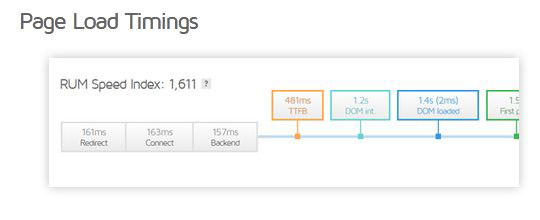
Pingdom : Load time < 1.2 seconds.
TTFB < 0.2 seconds
Improved web Vitals which is a must for the google SEO algorithm.
Applying the guide point needs expertise of hosting and advanced Magento coding.
This is a must have investment for an ecommerce site in present situation where google gives weight age to speed and conversion rate is related to site speed.
3.5 Use highly optimized theme like Hyva( Recommeded but this will result in a much higher development cost )
3.6 Go for Breeze theme developed by Swisslab (Recommeded but comes with challenges as requireJS has been eliminated so any module installed needs to be modified )
3.7 custom code your theme to eliminate require.js and Jquery library.
Avoid multiple page version by effectively using AJAX/XHR customer data load option.
Use separate URL version for multilingual as securi and other CDNs might not be able to efficiently handle same code delivery for language change.As then you need to enable header processing and specify some cookie for different language version.
Define Varnish VCL rules to bypass cache if cache creation will result in too many cache pages( case specific ).
If pricing has to vary based on customer groups or customer specific then load product price via XHR rather then handle when processing PHP. This will result in same page across all users.
LCP : Use preload or modify page design to handle this
CLS : With proper coding css and html this can be handled
Following Pages to be considered for optimization
Home page
Category/ Product listing page
Product page ( This is a must if you are into adwords or PPC )
Cart Page
Checkout Page.
Important Blogs
Let’s see in detail.
1. TTFB / server load reduction
TTFB includes : Blocking time, connecting time, TLS time and then PHP execution time till first byte reaches user browser.
1.1 Optimize TTFB
Time To First Byte (TTFB) is the time it takes for users browsers to receive the first byte of page content.
Google suggests that your TTFB should be less than 200ms. Otherwise, it’s considered bad TTFB.
Slow response time always affects the ranking and user experience. To get a better average TTFB ( Average server response time ) make sure that there is a high cache hit ratio. You can improve the TTFB of your site by using Varnish cache or full page cache. When a website uses cache, it delivers the content from the cache without executing PHP and MySQL this is as good as a static page delivered. Proper use of cache( varnish, block cache) will improve TTFB. Check with your hosting for TLS and connection time. A VPS or shared server are bound to have a higher value for connection and TLS. Also how far is your user from your server will also impact this value.
1.2 Use varnish cache instead of magneto default Full page cache.
cache is the key to site speed. PHP and MySQL processing can be eliminated if the cache is available. With Magento 2 Varnish is the must-have and recommended cache.
Varnish works as a reverse proxy. Varnish uses VCL to handle page variations based on URL plus cookie values and if this is handled effectively vanish cache hit ratio will be pretty high.
Varnish supports tags based cache flushing and Magento has integrated tag-based cache cleaning with varnish, so if developers have followed cache guidelines while developing then the cache data will be valid data. Configuration and efficiently using Varnish needs a team of experts who understand hosting and Magento caching.
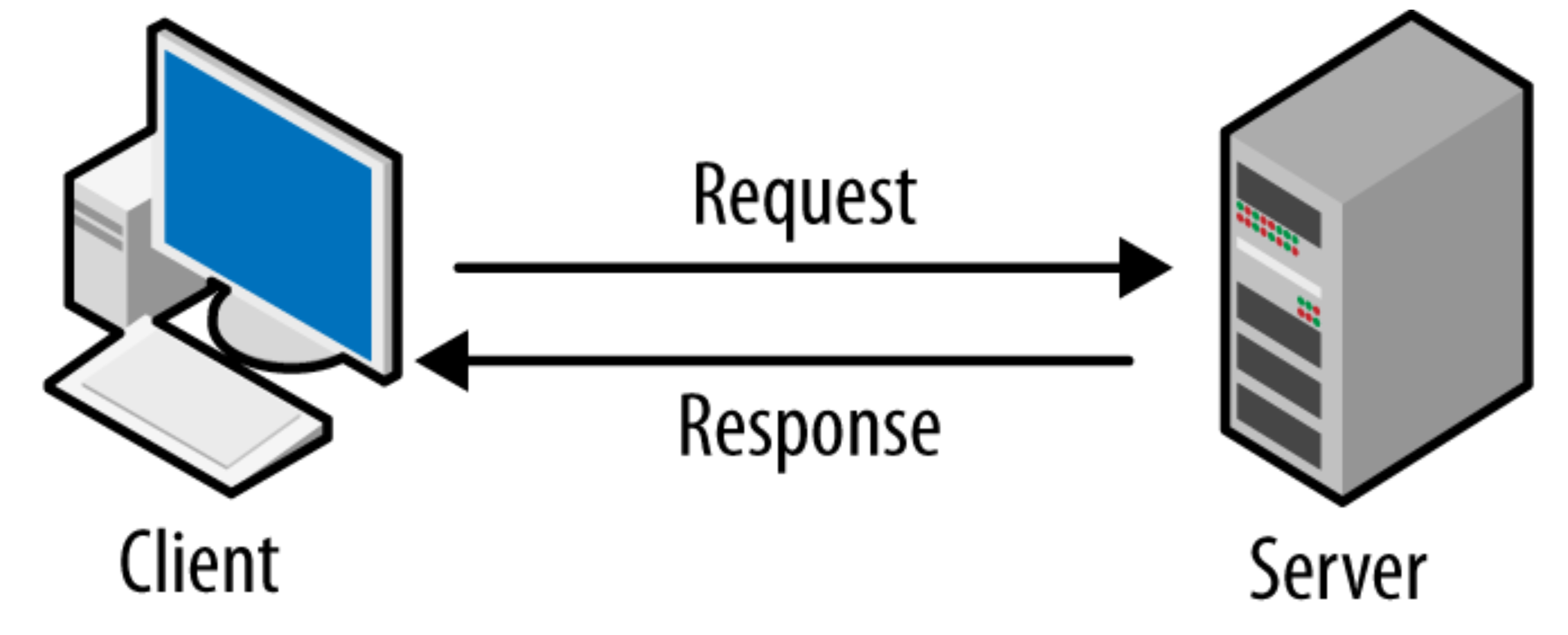
Varnish is a proxy server. It is the layer in front of the server. It delivers content from its cache so pages are as good as static pages. When a visitor requests your magneto site, then this request is first processed by Varnish and is not sent to Magento, it’s delivered from cache. Only if Varnish cache does not have a cached page then the request is passed to Magento.
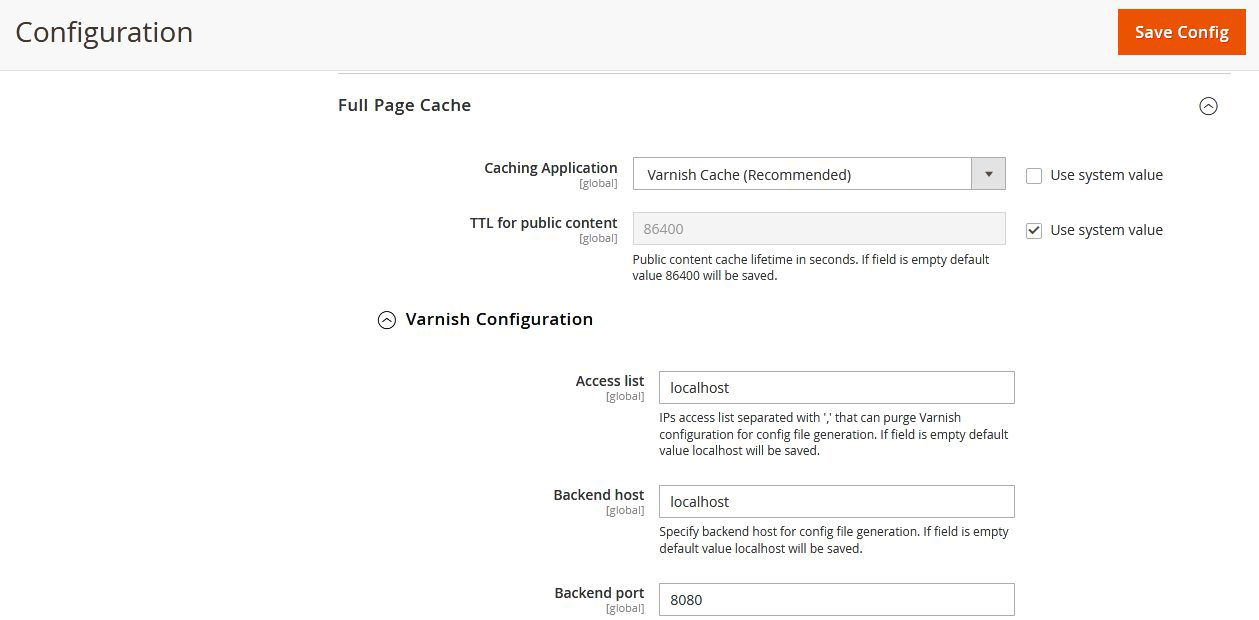
To configure Magento to use Varnish log in to the Magento Admin:
Go to Stores > Configuration > Advanced > System > Full Page Cache
From the Caching Application list, click Varnish Caching
Enter a value in the TTL for public content field
Expand Varnish Configuration and enter the specific information about your Varnish configuration
1.4 Enable Flat Catalog in Magento 2 ( not recommended if an elastic search is in use )
Magento uses the EAV (entity attribute value) model to store the data of products & customers. It stores the data in multiple EAV tables depending on their value type. Storing data in multiple tables means requiring more queries while retrieving data, and this process will slow down your magneto site. So to resolve this problem, you can enable flat catalog in Magento. A flat catalog helps to merge data into one. Flat tables are created by merging all the required front-end attributes of an entity into one. The flat catalog helps to improve performance by responding to MySQL faster. For example, your store contains more than 5000 products then enabling a flat catalog is beneficial. As Magento has implemented Elastic search so in case your Magento version supports elastic search then flat catalog is not recommended. To enable Flat Catalog in Magento.
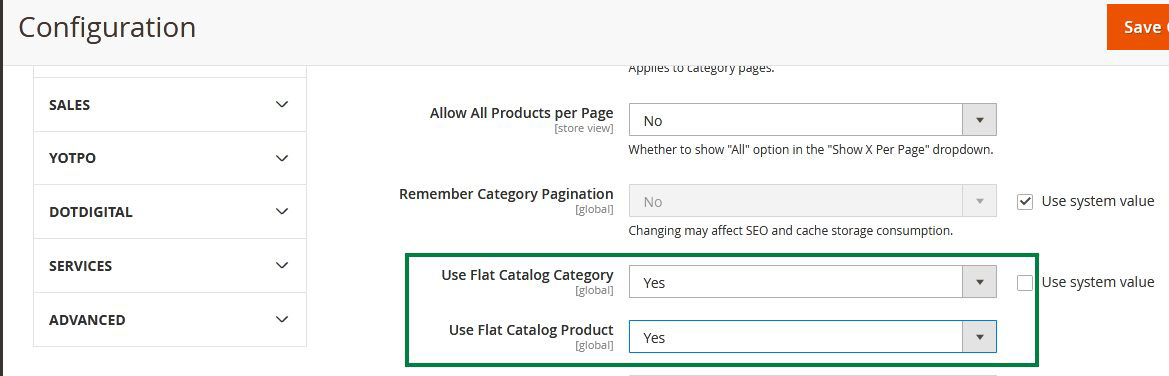
Go to “Stores” → “Configuration” → “Catalog.”
Under “Storefront” change “Use Flat Catalog Category” and “Use Flat Catalog Product” to “Yes.”
After this, “Save Config” and clear the cache.
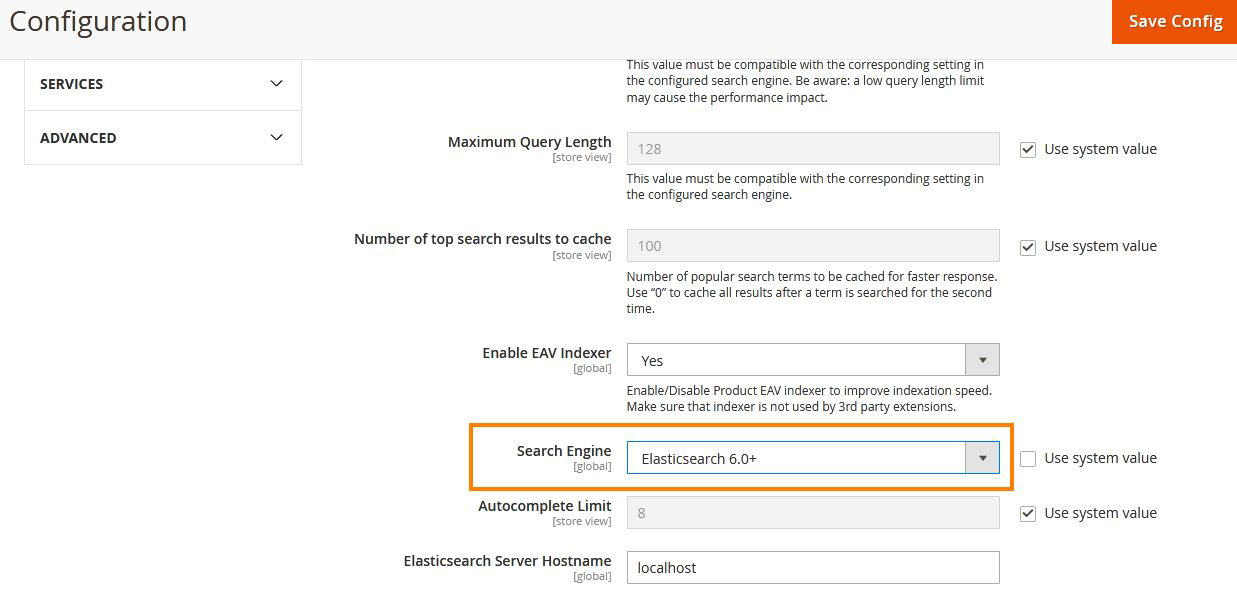
1.5 Go With Elasticsearch
Every user expects better and quick search results from an e-commerce website. Elasticsearch is one of the best ways to deliver quick search results to users. The elastic search comes up with advanced functionalities, render multi-language support, and other attributes that make it a reliable search option. When a customer conducts a search, Elastic Search will return search results based on its last generated index. If a new index happens while a customer is searching for something, then that index won’t affect the customer’s search results at all. In Magento Listing and search are delivered from elastic search. Elastic search also uses an option of attribute weight which means search result quality will be better then MySQL search. First, install Elastic search and login to the admin panel, and turn it on.
From the Search Engine list, click Elasticsearch or Elasticsearch 5.0+ or Elasticsearch 6.0+
1.6 Minimum logs to be generated
In Magento there are 3 types of logs generated
i.e System logs,
Debug log,
Exception log.
Always recommended to keep minimum log files. More logs if generated then server resources will be utilized in writing logs and this will impact Magento site speed.
Apart from logs that are logged in files, there are a few logs like Visitor logs etc that are saved in data base. By default, Magento keeps logs up to 180 days. Most of the site owners are not relying on these logs but they check google analytics. So either disable those lots or configure them to be cleaned after a short duration.
1.7 Make sure cache hit ratio is pretty high
Cache hit ratio refers to the percent of requests delivered from a cached page. explanation: Different user has resulted in a page request 10 times, and for a 9 times response given from cache, the hit rate is 90%. Hit rate (%) = [hits from page cache] / [total number of hits] * 100 If the hit rate is low, most of your users will have to wait for several seconds for the server to respond and generate the page, which is definitely not what we are looking for. Cache hit ratio should be high, if you’re using Varnish and making sure that cache cleaning is not very frequent, cache lifetime is properly thought of and cache tags and identifiers are given due consideration then a higher cache hit ratio can be expected.
1.8 Reduce extension
Use of many third-party modules means :
— Higher JS Payload.
— Higher deployment time.
— More SQL queries.
You can reduce the use of modules by weighing their benefits and if they are really needed for the website and for the specific page. It had been observed that on times development agencies will install the module and leave it installed and active though it is no more in use. You shall create a MySQL log with PHP stack to identify such calls and then decide on modules for a given page or for the website. There are some debugging modules that should be installed to get an idea of what all modules had been used by a specific page.
1.9 Clean Database Regularly
Tables that should be cleaned:
customer_visitor
report_event
report_viewed_product_index
report_compared_product_index
and many more.
1.10 Upgrade Magento to 2.4.x
Magento regularly releases new updates, upgrading Magento to 2.4.x for better performance. Every Magento upgrade adds various enhancements to the platform optimization, security patches and new enhanced features.
1.11 Upgrade PHP to 7.4 and above
Upgrade PHP to 7.4 version to see speed improvement on your website. PHP 7 runs faster than PHP 5. It helps to improve the site speed.
1.12 Delete unused stores
It has been observed that some of the Magento setups have unused stores.These were generally created during development or when the test data was installed.
Each store will result in extra static file generation time so a higher deployment time.
Additional tables ( flat tables ) and additional rows in the database indexed tables will overall increase the size of the database.Also indexing happens across all stores which results in extra resources and load on a server.
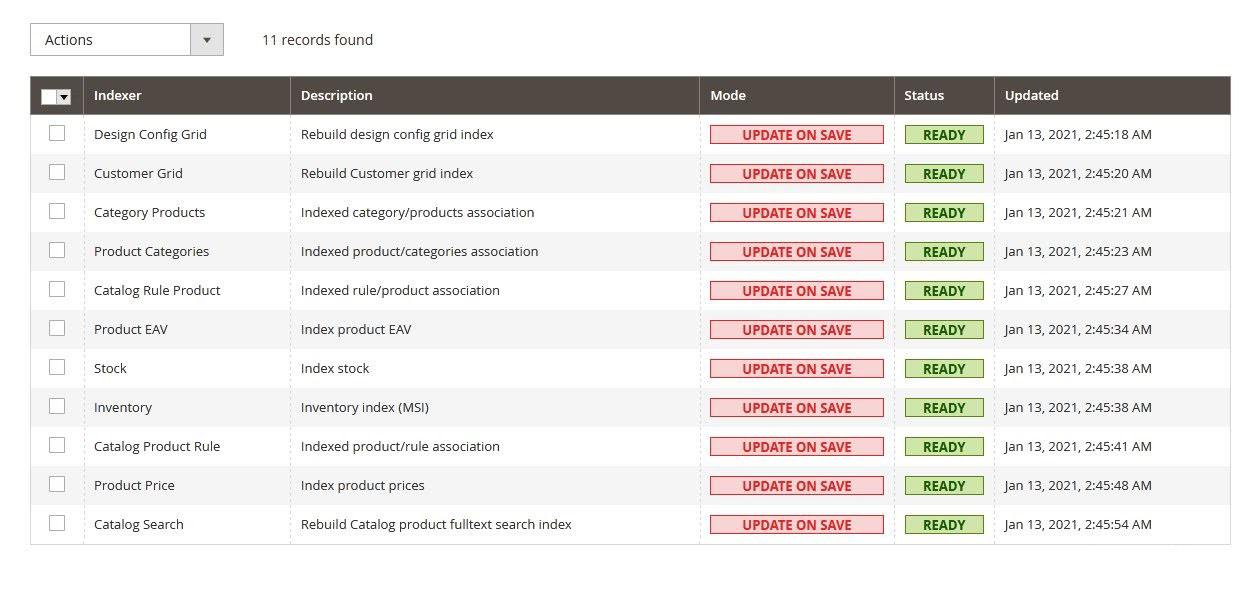
1.13 Indexers should be set on schedule
In Magento you can set indexers in two modes: ‘Update on Save’ or ‘Update on Schedule’
Indexes are used to create aggregation tables that Magento uses. Magento updates indexes on every object store by default, in some cases you need to update indexers manually.
Recommend to set the indexers ‘Update on Schedule’ rather then update on save as index starts running every time you save a product, category or attribute if its set to index on save.
You can update indexing from backend:
Go to the System->Index Management, select all indexers and from Actions dropdown select “Update on Schedule”
also, you can change the indexer’s mode by running the command:
php bin/magento indexer:set-mode realtime
1.14 Remove Unused Attributes
If your store contains a number of unused attributes, we recommend removing those unused attributes. Use the below command to remove unused attributes.
If an attribute is not used but is still there and set as searchable then that attribute will be in EAV tables, indexed tables, elastic search documents, etc.
So these are the unwanted overheads as we kept the attribute while its use was discontinued. This generally happens when we install a module that has attribute and later deactivate that modele.
1.15 Make sure Attributes Properties are defined to Expectation
It has been observed that at times certain attributes not in use still exist. Or certain attributes not needed in the front end or in collection or search are marked as attributes needed in front end due to configuration value.
This will result in indexer indexing them so that they are available in a flat table or in elastic search or in search table data. This results in extra data processing and a higher load.
2. Payload ( excluding JS payload )
2.1. Image Optimization
Images are the selling factor of products in any online Magento store. If images are clear & attractive then customers are always interested in buying products from your site.
Sometimes we see the use of heavy-size images on site, it is harmful to your site as it slows the website. Higher resolution images have larger file sizes that will take more time to download.
— Proper size as per device resolution( serve scaled images )
— Making sure images not displayed are not downloaded
— Image Sprite
— SVG
Using the below steps you can optimize images.
2.1.1 Serve scaled images
It is necessary to pay attention to image sizes and use perfect size images on your website.
For example, your website banner size is 1440 x 400 pixel and during display on the website the image size is using 2880 x 900 pixel. As a result, the browser has to download and scale the picture down before displaying it to the visitors. As a bigger image will need more time to download hence the user experience will be that of a slow Magento website.
This also means following parameters will see improvement :
Using a picture tag you can load multiple images of different sizes and resolutions, which can be the best fit for different viewports, so instead of loading a single image, the picture tag is useful to load multiple images as per viewport sizes. So it will help to reduce image payload and helps to achieve a speed of the site.
If you are using higher resolution images then this will negatively impact on website speed, specially when users access your website on mobile devices. Solution for this to optimize images. There are online tools available to optimize images or you can use Photoshop to optimize images.
2.1.4 Sprite Image
Instead of using a seperate images icons on header like social icons, mini cart icon, my account icon, search icon. You can use the sprite image and add all these icons in a single image and use that.
Use of sprite image also means reduced number of request.
2.2 Go for webP images
WebP is a modern image format and it is supported in Google Chrome, Firefox, Edge, the Opera browser, and by many other tools and software libraries. WebP helps to optimize images faster and reduce image sizes without compromising on the picture quality. For your Magento website image optimization, you can choose the Magento 2 WebP Images extension that helps you to automatically convert all current and future images on your website to WebP format. Using WebP, webmasters and web developers can create smaller, richer images that make the page load faster. WebP images are about 30% smaller in size compared to PNG and JPEG images at the equivalent visual quality.
WebP includes the lightweight encoding and decoding library libwebp and the command line tools cwebp and dwebp for converting images to and from the WebP format, as well as tools for viewing, mixing and animating WebP images.
Due to better compression of images and support for all these features, WebP can be an excellent replacement for most image formats: PNG, JPEG or GIF. You can see from the below example that WebP offers over 40% saving in image size for the same picture quality.
2.3 Lazy Loading
When a user opens the webpage, the entire page’s content is downloaded, if the site web page contains more images or content then it will take time to load.
So instead of loading all of the images at one time, images can be loaded when the user accesses a part of the page that requires it. With lazy loading, we can load on-screen images first, and on scrolling of pages, load remaining images so that we can reduce the site load and make it fast.
For Example, if your web page contains 100 or more images then instead of loading all the images at one time we can add images in lazy loading and load only required images on visible screen on page scrolling.
2.4 Add Picture tag for delivering images based on device resolution
< picture > tag is used to define & deliver multiple images based on device resolution. You can define multiple images by specifying its resolution.
2.5 Use Brotli or other compression technique
As is known that all html, css and JS should be compressed and then delivered.
Brotli is one of the most efficient compression used.
3. JS Payload
3.1 Go for Advance JS Bundling
There is a difference between Magento native SJ bundling and Advance JS Bundling. We recommend advanced JS bundling.There are few modules available to do this bundling.
It bindles JS based on the page where the JS is needed or a general set of JS that’s needed across all pages.
Also, some of the modules have a configuration that allows JS to be moved to a folder or excluded from JS bundling.
If you do not have time to check each JS file and individually handle the configuration for each page then advanced JS bundling is the way.
Amasty has an advance JS bundling module.
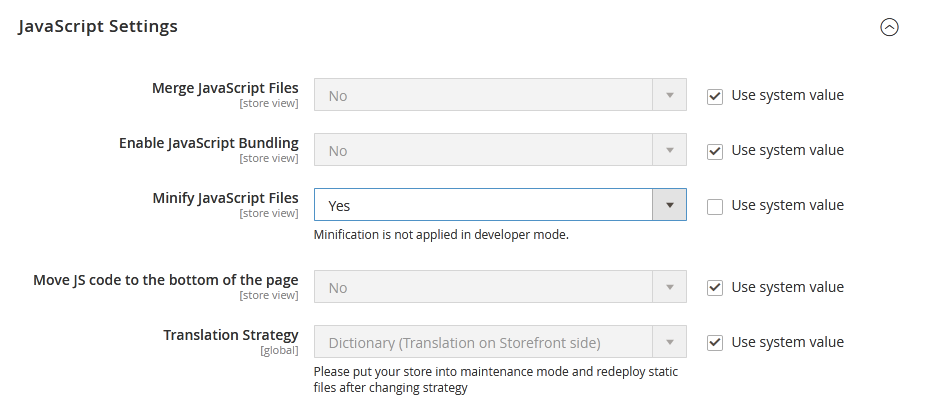
3.2 Minify JS
Minify JavaScript files to make the web page as light as possible, and ultimately speed up your Magento 2 store.
Set “Yes” for both Merge JS Files and Minify JS Files Options
3.3 Enable Browser Caching
Every time a browser loads a webpage it has to download all the web files to properly display the page. This includes all the HTML, CSS, JavaScript, and images.
Some pages might only consist of a few files and be small in size – maybe a couple of kilobytes. For others however there may be a lot of files, and these may add up to be several megabytes large.
Leverage browser caching helps to download pages faster as the browser will check the cache and retrieve from there rather than download.
In-Browser caching you can specify how long a web browser should keep images, CSS, js stored locally so that once a user access site in the future this data can download faster.
At times if a JS has been modified on the website then the browser might use its cache JS which might result in some functionality challenges so here developer needs to be alert.
3.4 Objective should be to reduce JS payload less than 300 KB
Make JS load faster in the browser. Reduce how much JS you use to build your page
Minify all JS resources
Use minified third-party JS.
Only load JS when it’s needed. Eliminate dead JS code. Split JS files to deliver essential components.
Go for the Advanced bundling
4. Server Configuration
4.1 Make sure unwanted cron is not getting executed plus schedule cron efficiently
Indexing on schedule is what we shall configure.
Not all crons are needed for each Magento website so this should be given thought to.
Also, the default frequency might not be right for all the Magento sites.
Hence a proper evaluation and configuration of corn and indexing need to be done.
4.2 Activate Production Mode to Boost Magento 2 Speed
There are 3 modes are available to operate the site namely, default, developer, and production. default and developer mode is used for debugging purposes. Production mode is used for deployment purposes on the live site. Enable production mode for better performance. Follow the command given below to enable the Production mode:
php bin/magento deploy:mode:set production
4.3 Enable Gzip Compression or better go for Brotli compression
Gzip Compression allows you to compress files for fast loading, using this you can compress big files into a smaller one and which loads much faster. With gzip, you can compress JS,CSS, HTML, Text files as well. This happens at the server level before sending them to the user browser.
For example, if your page size is 128 KB, Gzip compression will compress your page and send it to the browser with size 30-40 KB.
4.4 Use HTTP2
HTTP2 is the new internet protocol that is more efficient & faster than HTTP1. It works in continuous streaming and speeds up your Magento 2 website. HTTP/2 uses a single TCP (Transmission Control Protocol) connection to asynchronously send numerous requests for data to your server. You can download multiple files from a server in Async mode with no risks to site performance. To enable HTTP/2 all that is required is an SSL certificate (it requires TLS) and a server that supports HTTP/2.
4.5 Choose the right hosting
Recommended choosing the right hosting for your Magento 2 website. Oscprofessionals also provides hosting that is economical and stable. We also help e-commerce owners reduce their hosting costs. Please ask for a no obligation Audit on your hosting.
Hosting server’s plan and setup is also one of the important factors in speed optimization. Choose a better configuration server and a hosting company that understands Magento.
if you want no downtime then go with AWS auto scale setup but AWS cost much higher.
We are partners to AWS and Digital Ocean and can provide a plan that’s value to your money.
4.6 Use Varnish Instead of Full Page Cache
Referring to Magento 2 Devdocs best practices guide we can see that they have stated that for the Live site we shall go with varnish and for the development site we shall use full page cache. This is very important and Varnish should be a must in a Magento 2 setup.
4.7 Use CDN to Boost Up Content Delivery
Content Delivery Network integration is a default standard these days.
Magento allows configuration and easy integration with CDN provided all your modules and coding has followed Magento best practices.
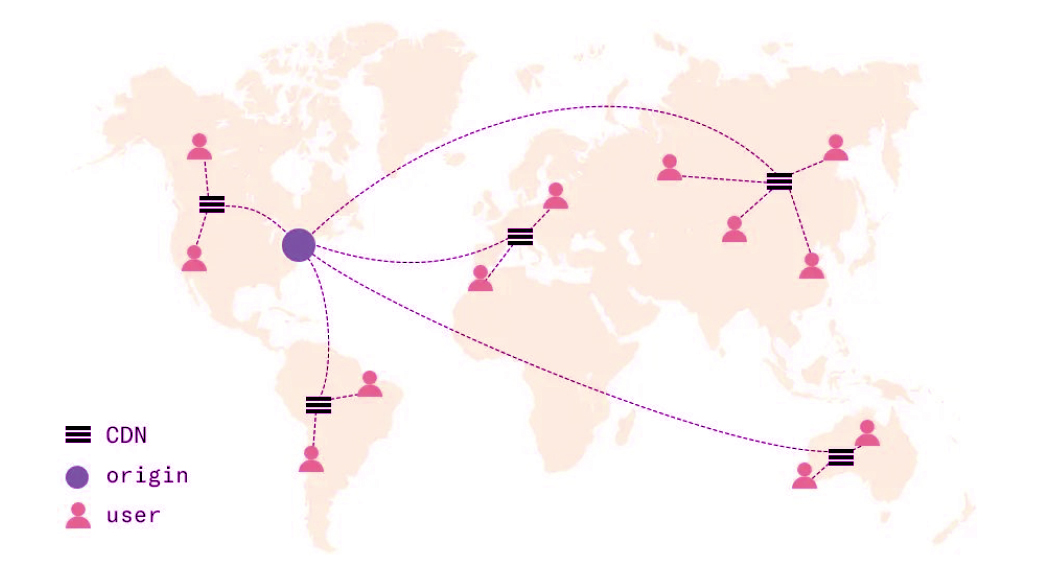
When a Visitor in a particular location (e.g US) makes the first request for a static content( CSS, JS, images ) on your website, then the asset is retrieved from your actual server when it is being delivered, and the assets get cached on the CDN’s US server, the nearest CDN edge location based on visitors location and your CDN providers server availability . When next time visitors request the same files, CDN edge server first check there cache if the asset is already in cache. If the request is already cached by the same edge server then the visitor will receive a response from the edge server. This reduces hop time and improves speed a bit.
This improvement in turn improves your web Vitals.
We recommend this as a mush have option.
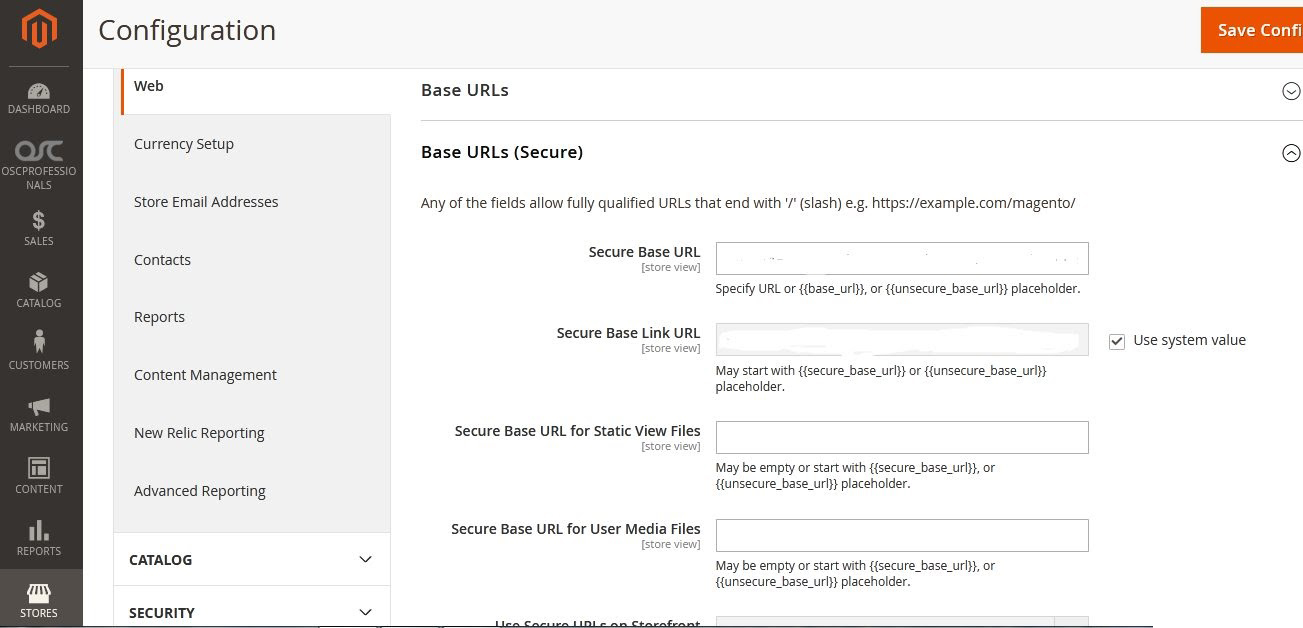
To configure CDN in Magento 2:
From Admin panel, go to the Store–>Configuration->>General–>Web
In the Base URL for Static View Files, enter the URL of the location on the CDN where static view files are stored.
In the Base URL for User Media Files field, enter the URL of the JavaScript files on the CDN
Open the Base URLs (Secure) section and continue with following:
In the Secure Base URL for Static View Files field, enter the URL of the location on the CDN where static view files are stored.
In the Secure Base URL for User Media Files field, enter the URL of the JavaScript files on the CDN.
When complete, click Save Config.
4.8 Upgrade to a higher Mysql version
Magento 2.4.x is now compatible with Mysql 8. Mysql 8 is known to be much faster hence its recommended to upgrade magento to 2.4.x and to use Mysql 8 or equivalent mariaDB database.
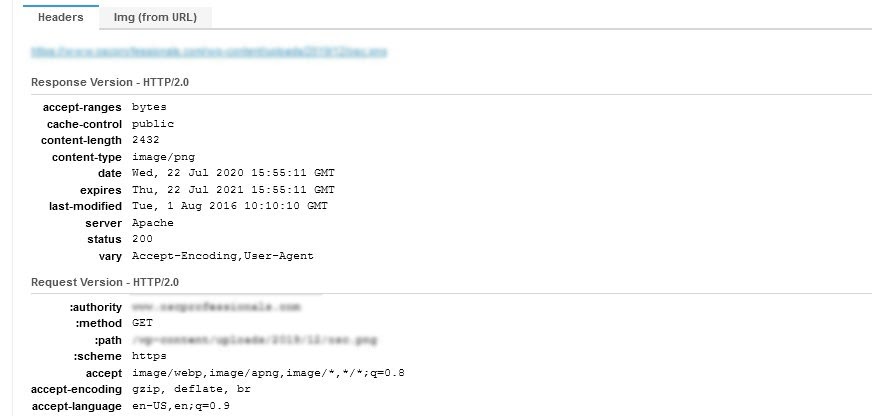
4.9 Add Expire Headers
Expires headers are useful to store and fetch the resources from the browser’s cache. By doing this your site loads faster as certain assets are being fetched from the browser cache
For example, if you set expired headers for images (jpeg) for 30 days, the browser will store all the JPEG files in its cache. This means a visitor browser can load the site faster as the browser has cached some JPG resources related to the site.
GSI and GTMetrix checks the value and period set for such resources and accordingly affects the page speed score.
5. Render Blocking
5.1 Apply critical CSS
To keep minimum render blocking time Magento has introduced the critical css concept from Magento version 2.3.3.
This will result in User experience faster loading time.
5.8 Analyse critical rendering path and see if some preload can be effectively used to reduce the impact of critical render path
Preload enables the browser to quickly download and cache a resource. So its useful when you need a resource within a few seconds of the page loading and wants to save time. you can pre load a number of things like,fonts, styles, scripts, images etc.
Preload for images
Preloading loads an image file into the users computer memory so that it can be instantly accessed when nedeed this is useful
Example:
< link rel=”preload” as=”image” href=”important.png”/ >
Preload for Css
When you are using preload you are moving the css load to after the window.
Load event meaning the rest of the page can load as well as the css.
Example
< link rel=”preload” as=”style” href=”combined.css” >
Preload for fonts
By adding the following link tag to your HTML header,you may Preload web fonts that are instantly required during Page load:
< link rel=”preload” href=”/webfontname” as=”font” type=”font/format” crossorigin >
where
The name of the web font fetching is “/webfontname”
The term format refers to the specific web font format(i.e ttf ,woff,woff2 etc.).
Google web fonts
If you use Google web fonts on your page, you may enable font-display functionality by using the & display=swap
argument at the end of your web font URL in your CSS.
< link href=”googlewebfonturl&display=swap” rel=”stylesheet” >
6. Configuration setting that improves performance
Below techniques help for performance optimization of your Magento 2 sites.
6.1 Full Page Caching: Use Varnish instead of Magento Full page caching.
The Varnish cache is the best solution Magento provides for the best performance. It responds very fast to the users requests. Caching improves server response time, reduces load on server. In Magento you can cache certain pages for faster response, not all the pages should be cached.
6.2 Set Indexers to “Update on Schedule”
Indexing helps to improve performance. Magento reindexes automatically whenever one or more products change. Magento reindexes in the background process. Reindexing updates database tables and those aggregate or index tables speed up processing and improve site speed.
The indexers can be set to either ‘Update On Save’ or ‘Update On Schedule’
‘Update On Save’: in this mode, magento starts reindexing on save actions. This will result in user sessions consuming reindexing resources.
‘Update On Schedule’: in this mode , reindex runs according to a schedule as a cron job, so the user session will not consume resources.
6.3 Elasticsearch
Elasticsearch is a highly scalable distributed search engine, it includes both search suggestions and recommendations.
Listing,layered navigation and search results are delivered from elastic search.
This reduces SQL load which on time is busy with other Mysql queries processing.
These collection queries are heavy and with the use of Elastic search Mysql does not have to worry and do its other tasks and the average response time on critical activities like add to cart and checkout improves.
6.4 Using a Flat Catalog ( If Elastic search not installed )
We would recommend enabling flat catalog for quick reindexing & speedup processing. Magento stores catalog data in multiple tables, based on the EAV (Entity attribute value) model, and due to this product attributes are stored in many tables, SQL queries are sometimes long & complex.
Flat catalog creates a new table( Product table : catalog_product_flat_1 where 1 is the store ID), where each row contains all the necessary data about a product or category.
6.5 Content Delivery Network
CDN (Content Delivery Network)can be used to store media files. CDN delivers fast to the users requests as it delivers content from the nearest server of the users. When a Visitor in a particular location (e.g US) makes the first request for a static content on your website. Then the asset is retrieved from your actual server when it is being delivered, and the assets get cached on the CDN’s US server, the nearest CDN based on visitors location. When next time visitors request the same content on your website, the request goes to the nearest CDN edge server to check if the asset is already in cache. If the request is already cached by the same edge server then the visitor will receive a response from the server. This helps in improving the load time.
PHP : configuration and server resource allocation.
Mysql : Adobe recommends memory allocation for Mysql to be half the size of Database.This looks very high and costly in that case you shall keep cleaning your database and using cache effectively..
8. Caches
Varnish: Sufficient sufficient memory allocation.
Here developers should avoid duplicate pages cached due to improper coding. An additional identifier can result in multiple pages. An additional rule in VCL can result in multiple pages. Had seen instances where customer-specific pages were cached. We shall use the private data concept for customer or customer group-specific data to reduce the number of pages cached.
Also if there are pages rarely used but can eat up on varnish memory then VCL can be used to bypass such pages from being cached or delivered from varnish.
Redis : Redis is more for variables and session data to be cached.
If you have varnish as a cache then saving blocks or Full page on Redis is not a good idea.
Network Bandwidth : Network bandwidth is not costly these days but can be a blocker if this is not considered when setting servers for performance.
Software Recommendation :
PHP ( higher the better so check whats the highest PHP version compatible with your Magento version ).
PHP extensions for Magento functionality that are used should be there others should be removed.Do not keep adding PHP libraries unless very important.
OpCache module and properly configure it
9. APCU is recommended.
Other Points :
Webserver : Nginx or litespeed is recommended over apache.
Mysql : Go for the highest version of Mysql thats compatible with your Magento version.
Conclusion:
It’s very essential for your online Magento store to be fast. Our article will help you to understand how you can achieve the desired speed of the site. By applying these speed optimization techniques you can improve the site speed. Contact us If you have any questions related to this article or if you need an optimization service or if you have any suggestions.
We can guarantee( conditions apply ) a score of above 90 for desktop and a score of above 60 for Mobile view.
 Skip to content