Skip to content

Cache Tags in Magento: 1 Small Mistake That Triggers Site-Wide Cache Clears
Introduction:
Cache tags in Magento play a critical role in controlling when cached pages are invalidated. They are the backbone of Magento’s Full Page Cache (FPC) efficiency. When implemented correctly, they ensure that only the necessary parts of the cache are cleared when data changes.
However, a single incorrect cache tag especially on a high-traffic page like the homepage can silently destroy your cache efficiency. This kind of issue doesn’t immediately throw errors or break functionality, but it creates continuous cache invalidation behind the scenes, leading to unnecessary server load and degraded performance
Example (Homepage Scenario + Mistake)
Consider a typical homepage setup:
- Banners (static or CMS-driven)
- CMS blocks
- A featured product section (slider/grid)
Everything looks normal from a UI perspective. But when you inspect the response headers, you notice something like:
X-Magento-Tags: cms_page_1,cat_p,catalog_product_12
The critical issue here is the presence of:
cat_p
This tag represents all category products collectively.
What Happens Next:
At first glance, this may seem harmless. But in production, this leads to a cascading performance issue:
→ Any product update triggers invalidation
Even a small product change (price update, stock change, attribute update) will invalidate all cache entries associated with cat_p.
→ Homepage cache is cleared even for unrelated changes
Your homepage may only show a few selected products, but because it carries the cat_p tag, it gets invalidated for every product update across the catalog.
→ Full Page Cache keeps rebuilding under load
Instead of serving cached pages, Magento is forced to regenerate the homepage repeatedly. Under traffic, this leads to increased CPU usage, slower response times, and reduced cache hit ratio.
The Core Mistake:
This issue typically originates from a homepage block most commonly a product slider or featured product section.
What happens internally:
- The block loads a product collection (often broad or unfiltered)
- Magento automatically attaches cache identities from that collection
- Instead of specific product tags, it attaches an aggregate tag like cat_p
This is not always obvious during development because everything appears to work correctly. The problem only becomes visible at scale when cache invalidation frequency increases.
Better Approach:
Instead of allowing aggregate tags like cat_p, the goal is to keep cache tags as granular and specific as possible.
Recommended approach:
→ Use specific product tags
Example:
catalog_product_45, catalog_product_78
→ Use specific category tags when needed
Example:
catalog_category_12
→ Avoid aggregate tags like cat_p on high-traffic pages
Especially on the homepage, where stability of cache is crucial.
By doing this, cache invalidation becomes targeted. Only the relevant pages are cleared when a specific product or category changes.
How to Check and Fix
Step 1: Log Cache Tags
The first step is visibility. You need to confirm whether problematic tags like cat_p are present in your responses.
You can log cache tags using a plugin:
namespace Vendor\Module\Plugin;
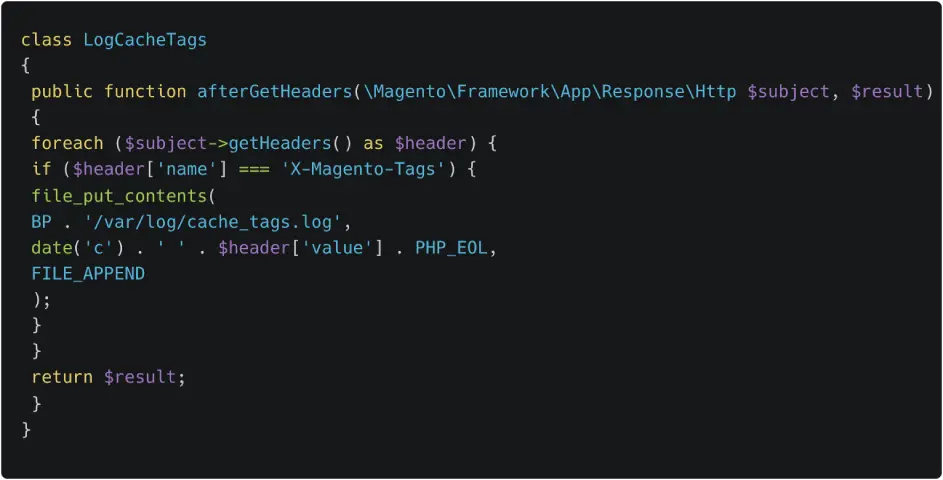
Sample log output:
2026-04-27T10:21:34+00:00 cms_page_1,cat_p,catalog_product_12
This confirms that the homepage (or any page being tested) is carrying the cat_p tag.
Step 2: Identify the Block Responsible (Architecture Approach)
Once you detect the problematic tag, the next step is to trace its origin.
Cache tags in Magento originate from the getIdentities() method of blocks and models.
You can log the source like this:
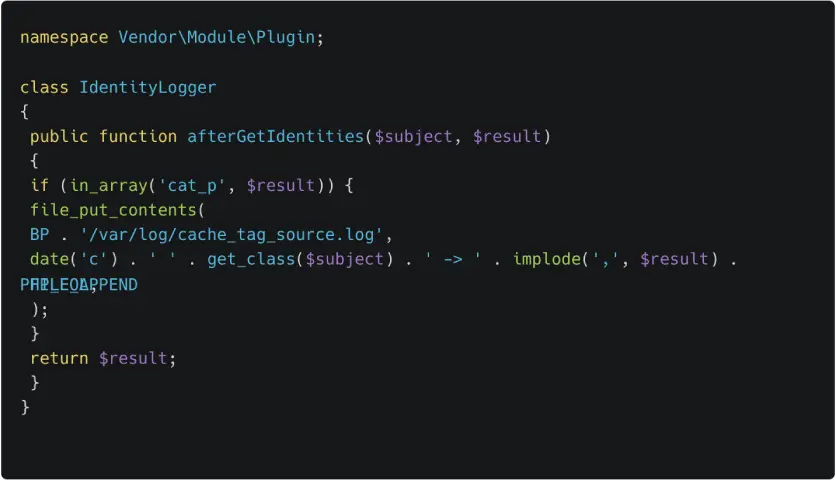
Sample log output:
2026-04-27T10:32:11+00:00 Vendor\Module\Block\Homepage\FeaturedProducts -> cat_p
Now you know exactly which block is responsible.
Next, trace it in the layout:
<block class=”Vendor\Module\Block\Homepage\FeaturedProducts” name=”homepage.featured” />
This gives you a direct path to the source of the issue.
Fix Patterns:
Once the block is identified, apply these fixes:
→ Avoid loading full product collections
Broad collections tend to introduce aggregate tags.
→ Limit to specific product IDs
Fetch only the products you actually display.
→ Override getIdentities() with precise tags
Manually control which cache tags are returned to avoid unintended invalidation.
These changes ensure that only relevant cache entries are affected when data changes.
Takeaway:
Using cat_p on the homepage effectively turns every product update into a full cache reset.
This is not just a minor inefficiency it directly impacts performance, scalability, and server load.
Fixing even one problematic block can significantly improve cache stability, increase cache hit ratio, and reduce unnecessary processing under traffic.
Call to Action:
Audit your homepage today.
If you see cat_p in your cache tags, trace it back to the source block and eliminate it before it impacts performance at scale.
If you’ve encountered similar issues or implemented a different fix, share your experience happy to discuss.