 Skip to content

Table of Contents
- What Are Plugins and How Do They Actually Work
- When to Use Plugins and When Absolutely Not To
- Performance: The Hidden Cost of Every Interceptor
- Debugging a Plugin Chain A Practical Walkthrough
- Reading Generated Code and Metadata
- Upgrade Pain: When Magento Changes a Method Signature
- The Rules That Save You
What Are Plugins and How Do They Actually Work
A plugin also called an interceptor lets you modify the behaviour of any public method on any class without touching the original code. In Magento 2 plugin interceptors, You declare the plugin in di.xml, run setup:di:compile, and Magento generates a wrapper class called an Interceptor that sits between the caller and the original class at runtime.
There are three plugin types. Each has a specific job. Mixing them up is where most developers go wrong.
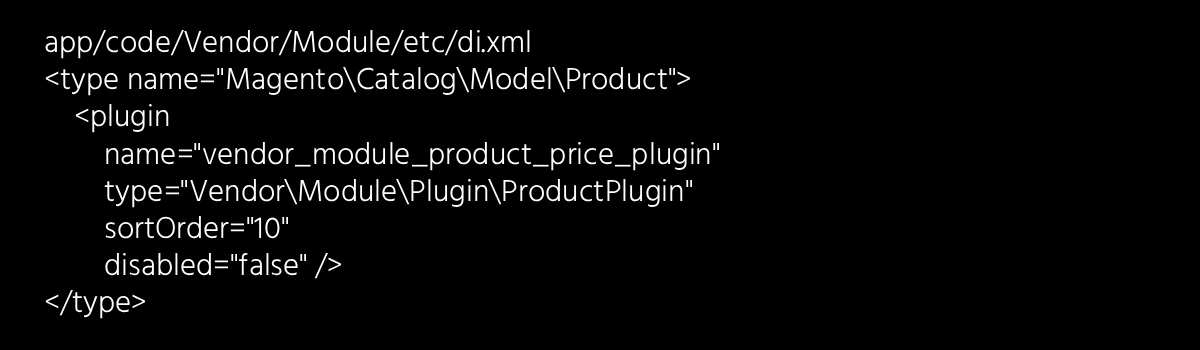
The Three Plugin Types
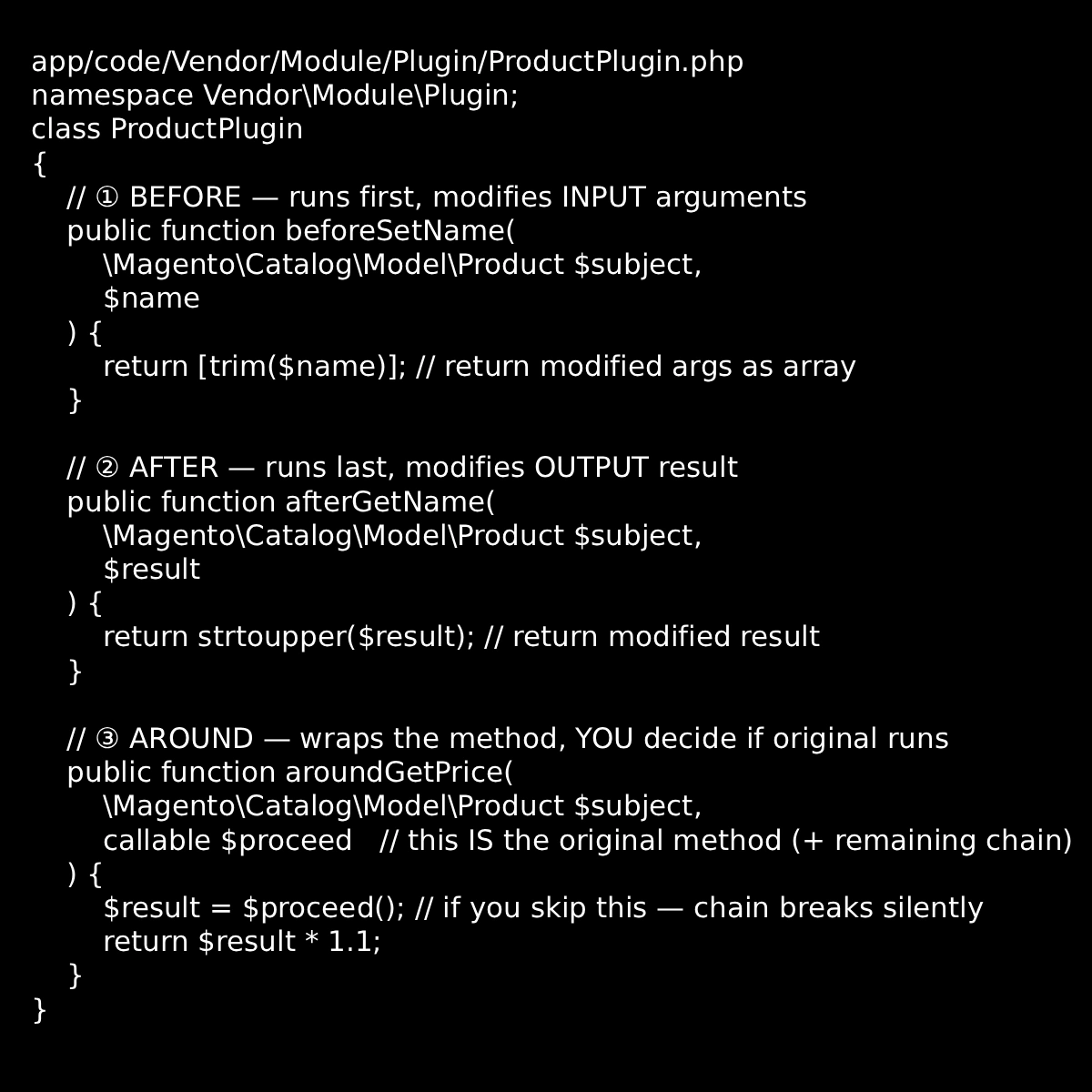
How sortOrder Works
When multiple plugins target the same method, sortOrder controls execution sequence. Lower numbers run first for before plugins. For after plugins, the order reverses the last before plugin runs its after counterpart first. This is counterintuitive and a common source of bugs when stacking plugins from multiple vendors.
When to Use Plugins and When Absolutely Not To
The biggest misuse of plugins in real Magento projects is not writing them incorrectly it is reaching for them when a better tool exists. Here is the decision framework every architect should have in their head before writing a single line of plugin code.
| Scenario | Use Plugin? | Better Alternative |
| Modify arguments going into a method you don’t own | ✓ before | – |
| Modify the return value of a method you don’t own | ✓ after | – |
| Conditionally prevent a method from running | ✓ around | – |
| React to something that happened (order placed, product saved) | ✗ No | Observer / Event |
| Replace an entire class implementation | ✗ No | Preference (di.xml) |
| Add new behaviour to a class you own | ✗ No | PExtend / Override directly |
| Modify a private or protected method | ✗ Cannot |
Preference + extend |
| Modify a static method or final class | ✗ Cannot |
Preference or rewrite |
The Around Plugin Trap
The around plugin is the most overused and most dangerous of the three. In Magento 2 plugins interceptor developers reach for it because it feels powerful you wrap the whole method and do whatever you want. But this power comes at a serious cost.
Wrong: Use Around
You just want to modify the return value
You always call $proceed() unconditionally
There are already 2+ around plugins on this method
The method runs inside a loop
You don’t actually need to stop the original
Right: Use Around
You need to conditionally prevent the original from running
You need to wrap with try/catch and handle exceptions
You need to measure execution time of the original
You need to pass modified args AND modify the result
The Silent Chain Break
If an around plugin does not call $proceed(), every plugin after it in the chain and the original method itself will never execute. No exception is thrown. No warning in logs. The method returns null or whatever your plugin returns, and the next developer spends half a day figuring out why data is missing.
This is the single most common cause of “unexplained” broken behaviour on sites with multiple third-party extensions.
Performance: The Hidden Cost of Every Interceptor
This is the conversation that rarely happens during development and always happens after a performance audit. In Magento 2 plugins interceptors,Every class that has at least one plugin registered against it gets a generated Interceptor class. That Interceptor wraps every public method on that class not just the ones with plugins.
generated/code/Magento/Catalog/Model/Product/Interceptor.php
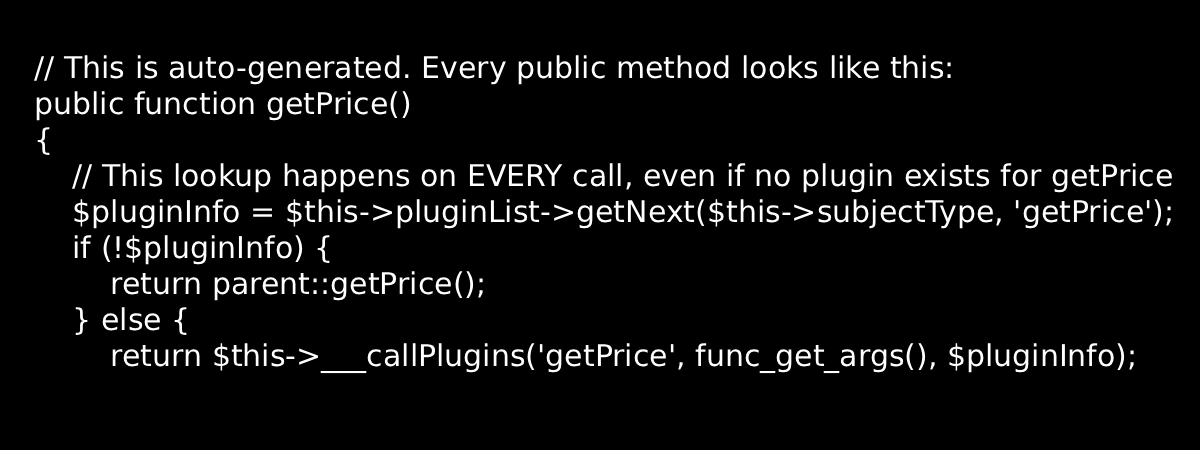
That pluginList->getNext() call runs on every method invocation. On a class like Product with dozens of public methods called repeatedly during a single page load a product listing page for example this accumulates fast.
The Worst Offenders in Real Projects
? High Risk: Plugins on These Will Hurt You
Magento\Catalog\Model\Product getPrice(), getName(), isSalable(): called per product, per listing page. A page with 24 products calls these 24 times each.
Magento\Quote\Model\Quote\Item : any method here runs in a loop for every item in the cart. An around plugin here on a cart with 10 items executes 10 times before checkout even loads.
Magento\Checkout\Model\Session : heavily plugged by third-party modules. Checkout is already the most expensive page in Magento. Every unnecessary plugin here adds measurable latency.
Magento\Framework\App\Config\ScopeConfigInterface : config reads happen constantly. Plugins here affect almost every page load across the entire application.
# Count plugins registered against a specific class
grep -r “Magento\\Catalog\\Model\\Product” app/ vendor/ \
–include=”di.xml” -l
# List all plugin declarations for a class across all modules
grep -rA2 ‘name=”Magento\\Catalog\\Model\\Product”‘ \
app/ vendor/ –include=”di.xml”
If your plugin only needs to run in a specific area (frontend, adminhtml, webapi), declare it in the area-specific di.xml e.g. etc/frontend/di.xml instead of the global etc/di.xml. This prevents the plugin from loading on every request regardless of context and reduces the plugin chain on non-relevant pages.
Debugging a Plugin Chain: A Practical Walkthrough
Debugging plugins is one of the most frustrating experiences in Magento development. The class you read in your editor is not the class being executed. What runs at runtime is the generated Interceptor. Here is a step-by-step approach that actually works.
1. Confirm the class is being intercepted
Add a get_class($object) or var_dump(get_class($this)) inside the class. If it returns ClassName\Interceptor, plugins are active. If it returns the plain class name, plugins are not loading check if setup:di:compile has been run.
2. Find all plugins registered on the class
Open the generated Interceptor file at generated/code/Vendor/Class/Interceptor.php. At the top you will see all injected plugin instances as constructor arguments. These are your culprits.
3. Check the metadata for execution order
Open generated/metadata/global.php (or the area-specific metadata file). Search for the class name. The array structure shows you exact plugin names, types (before/around/after), and sortOrder in the order Magento will execute them.
4. Add temporary logging to isolate the issue
In your plugin, add error_log(‘Plugin X: aroundGetPrice called’); at the entry point. Check var/log/debug.log to confirm your plugin is being called and in what sequence relative to others.
5. Disable suspect plugins temporarily
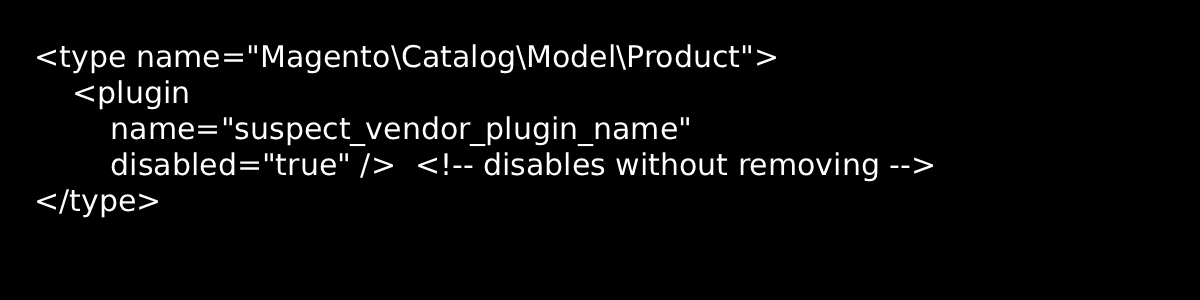
In di.xml, set disabled=”true” on a suspect plugin and flush cache. This is the fastest way to isolate which plugin in a chain is causing unexpected behaviour without deleting code.
// Temporarily disable a plugin for debugging
Reading Generated Code and Metadata
The generated/ folder is your best friend when debugging plugins. Most developers never open it. Here is what it contains and how to read it.
The Interceptor File
Located at  . This is the actual class being instantiated at runtime. Open it and look at the constructor every injected plugin instance is listed there. The method bodies show you the exact ___callPlugins chain being invoked.
The Metadata Files
generated/metadata/global.php — plugin registry excerpt
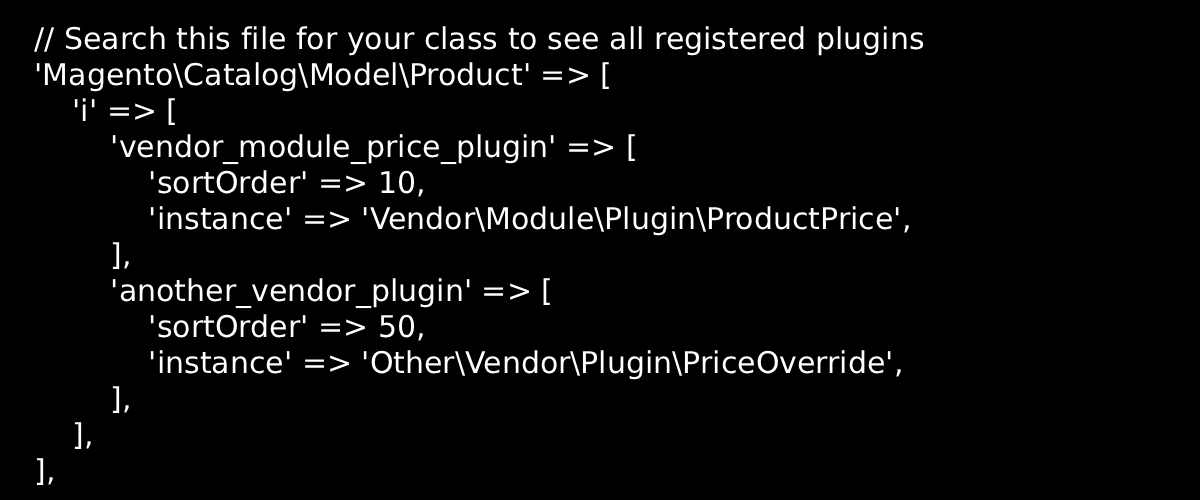
✓ Quick Audit Command
To see every plugin registered on a class across your entire codebase including all vendor modules run this from your Magento root after compile:
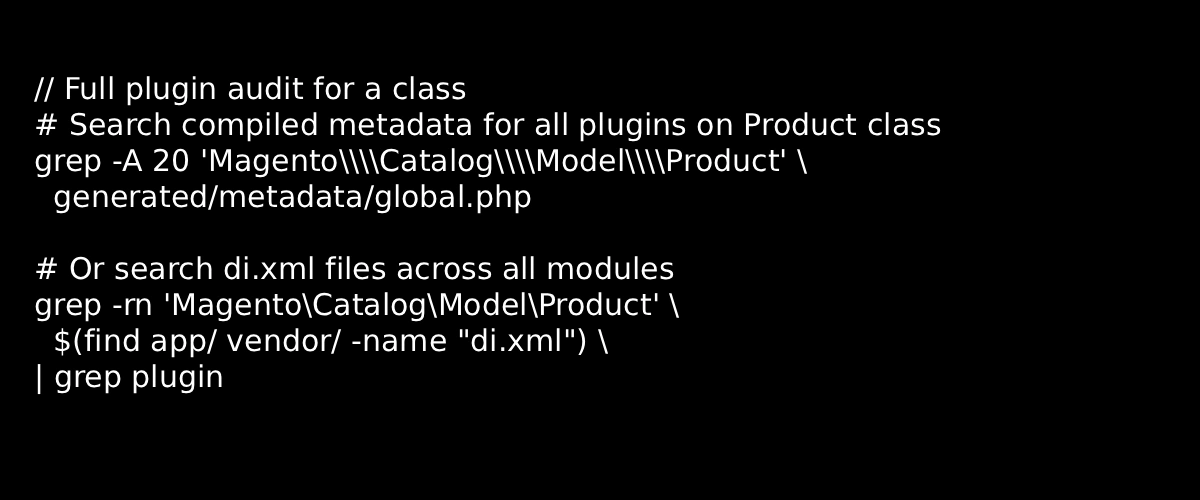
Upgrade Pain: When Magento Changes a Method Signature
This is the topic that every Magento architect has a war story about. Plugins are tightly coupled to method signatures. When Magento updates a class adds a parameter, changes a return type, renames a method, or refactors internals your plugin either breaks silently or throws a fatal error.
Here is a real upgrade scenario that happens regularly:
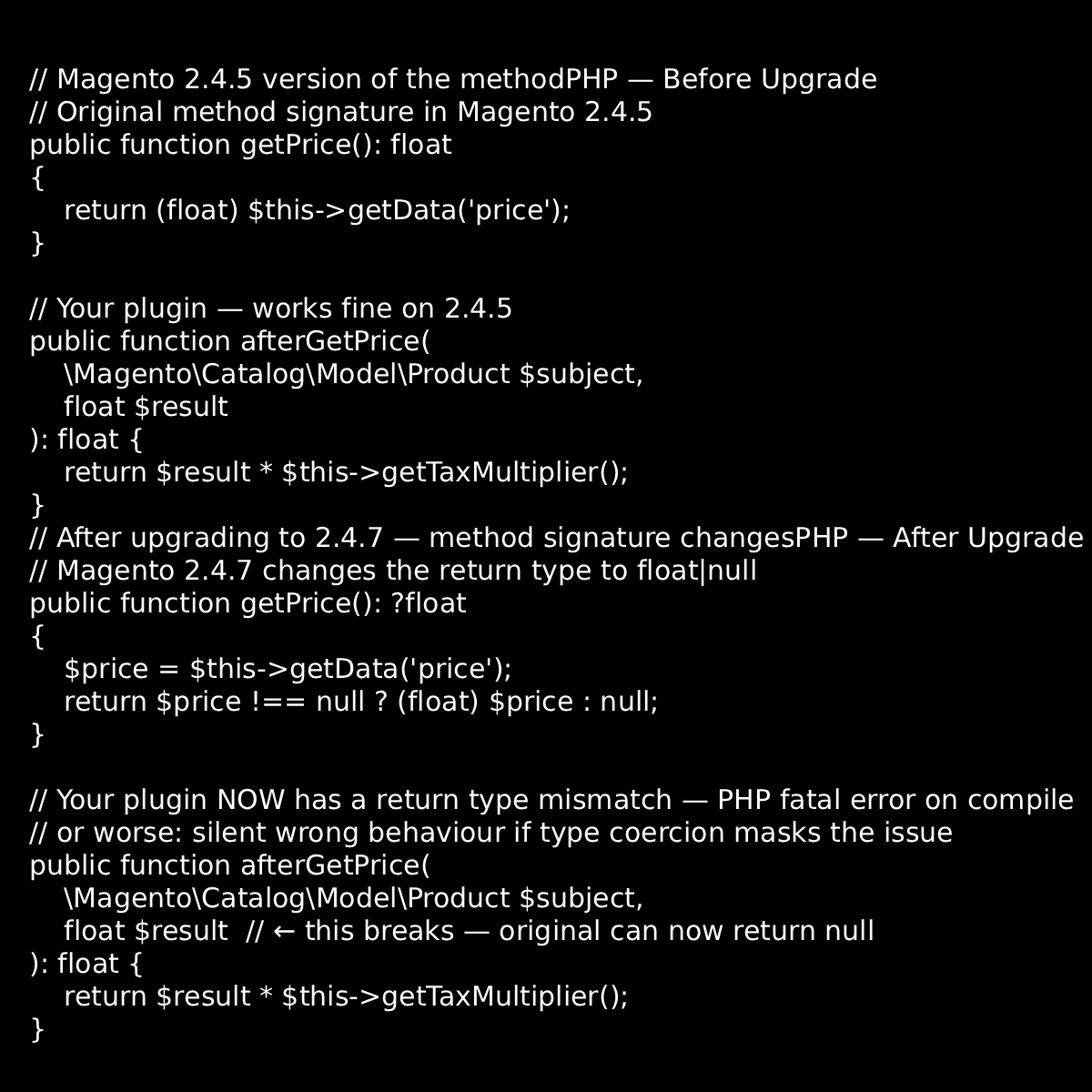
How to Handle Signature Changes Defensively
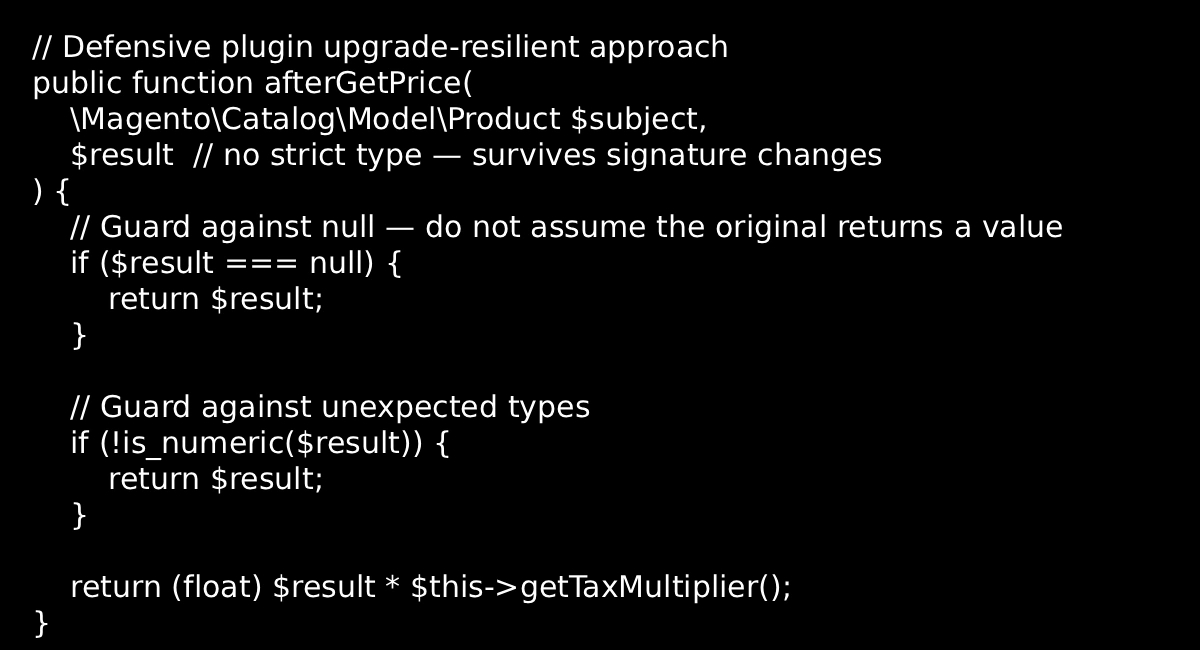
⚙ Pre-Upgrade Checklist for Plugin-Heavy Projects
1. Audit your plugins before every major upgrade. List every plugin your modules declare and cross-check against the upgrade’s changelog or GitHub diff for the targeted classes.
2. Run setup:di:compile on a staging environment first. Type mismatch errors and missing method errors surface here before they hit production.
3. Avoid strict return type declarations in plugin methods. Use PHP type hints on arguments but be flexible on return types they need to match whatever Magento evolves the original to.
4. Never plugin a @api-unmarked method on a core class. Only methods marked @api carry a backwards-compatibility guarantee. Everything else can change without notice.
The Rules That Save You
After everything above, here is the distilled set of rules that should sit at the back of your mind every time you open di.xml to declare a plugin.
- Use before and after for 95% of cases.
- Use around only when you own the decision of whether the original runs.
- Never plugin a method that runs inside a loop.
- Only plugin methods marked @api on core classes.
- Declare in area-specific di.xml whenever the plugin is not needed globally.
Plugins are not free. Every interceptor is a PHP method call you didn’t write but you will absolutely debug.

















