 Skip to content

SVG-Based Attacks in Magento: A Quiet Shift After Polyglot Exploits
Most Magento security checks still focus on familiar patterns detecting injected JavaScript, modified core files, or suspicious third-party scripts. That approach has historically been effective, but it no longer covers the full attack surface.
A lesser-discussed technique is the use of SVG files as an execution vector, often following initial access through polyglot uploads. Since SVG is XML-based and supports embedded scripting and event handlers, it can be used to deliver malicious payloads in ways that bypass traditional checks.
Unlike direct script injection, these attacks may not alter core files or obvious frontend assets, making them harder to detect through standard monitoring.
While not yet the most common attack pattern, this approach highlights a gap in many Magento security strategies especially around file validation and content sanitization.
What is happening
The attack flow is evolving in ways that blend into normal Magento behavior, making detection during routine audits more difficult.
Instead of directly modifying checkout logic, attackers may take a more subtle path:
They begin by uploading a polyglot file one that appears to be a valid SVG image but contains embedded script content.
The file is stored in the /pub/media directory, which is typically treated as safe user-generated content.
The SVG is then referenced through CMS blocks, pages, or other frontend content.
If the SVG is rendered in a context that allows script execution (such as inline embedding or via certain HTML tags), the embedded payload may execute in the browser.
This does not necessarily break functionality, which makes it harder to detect.
In scenarios where script execution is possible, an attacker could:
- Manipulate the DOM or inject overlays
- Capture sensitive input data
- Allow the original checkout flow to continue normally
From a customer’s perspective, everything may appear legitimate the order is placed and confirmation is received while sensitive data could already be exfiltrated.
While this is not the most common attack pattern, it highlights a gap in how file uploads and frontend rendering contexts are often validated.
Example Code
To understand the risk, it’s important to look at both the SVG file and how it gets rendered.
i. Sample SVG with Embedded Script

This looks like a normal image file but includes embedded script capability.
ii. Execution Depends on Rendering Context
Case A: Rendered as an image (generally safe)
< img src=”/pub/media/demo.svg” / >
- SVG is treated as an image
- Script does not execute
in most modern browsers
Case B: Rendered using (potential execution)

- SVG is loaded as a document
- Embedded script can execute depending on browser behavior
Case C: Inline SVG via CMS (higher risk)
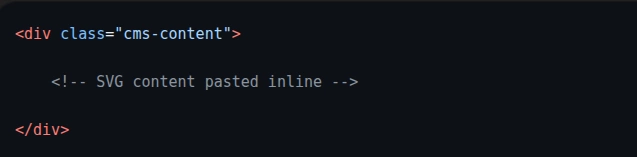
- Becomes part of the DOM
- Script execution becomes possible if not sanitized
iii. Magento Context
Example usage in CMS:

If combined with flexible HTML rendering (like <object> or inline SVG), this creates a path where uploaded SVGs may execute code without modifying core files or traditional JS assets.
Why This Works
This approach is effective not because of a single vulnerability, but because it leverages a combination of assumptions and blind spots in typical Magento setups.
a. SVG supports embedded logic
SVG is not just an image format it is XML-based and can include scripts and interactive elements.
While modern browsers restrict execution in many cases, SVG can still act as a carrier for executable logic when rendered in certain contexts (such as inline embedding or via specific HTML tags) and when not properly sanitized.
b. Media files are treated as low-risk assets
The /pub/media directory is commonly used for storing images and other user-generated content.
In many implementations, these files are less strictly validated and are not deeply inspected during routine security audits, increasing the chances of malicious payloads going unnoticed.
c. No direct changes in core or checkout logic
Traditional security checks typically focus on:
- Core Magento file integrity
- JavaScript bundles
- Checkout-related scripts
In this case, none of these are modified. The payload is executed at runtime through a referenced file, allowing the codebase to appear clean under standard integrity and diff-based checks.
What to Check in Audit
Given this shift, audit strategies need to expand beyond code-level inspection and include file-based execution paths.
1. /pub/media directory
Review this directory for:
- Recently added SVG files
- Files with unusual naming patterns
- SVGs that do not align with business usage
Also verify where and how these files are referenced.
An unused file may be harmless, but a referenced SVG in an executable context can introduce a potential attack vector.
2. CMS blocks and pages
Check for:
- Inline SVG usage
- References to media files that seem out of place
- Embedded content that could render SVGs dynamically
Pay attention to how SVGs are rendered as execution risk depends on the rendering context.
3. Upload entry points
Trace how files can enter the system:
- Admin uploads
- API-based uploads
- Third-party extensions handling media
Look for gaps such as:
- File type validation based only on extension
- Missing MIME/content validation
- Lack of SVG sanitization
4. Runtime checkout behavior
Even if no code changes are visible, observe:
- Unexpected overlays or UI elements
- Components that do not match the theme
- Unusual DOM changes during payment steps
Use browser DevTools to inspect the DOM and network activity.
These signs may indicate runtime injection rather than stored code changes.
Basic Hygiene Checks Often Missed
While focusing on advanced attack patterns, it is equally important not to overlook foundational issues that can weaken the system.
Unresolved Git conflicts
Search the codebase for markers like:
<<<<<<<
=======
>>>>>>>
Example:
<<<<<<< HEAD
$current_code
=======
$incoming_code
>>>>>>> feature-branch
Here’s what each part means:
- <<<<<<< HEAD → Your current branch’s code
- ======= → Separator between the two versions
- >>>>>>> feature-branch → Code coming from the branch you’re merging
So Git is basically saying:
“I found two different versions of this code and I don’t know which one is correct.”
These indicate incomplete merges and can lead to unpredictable behavior or even expose unintended logic.
These indicate incomplete merges and can lead to unpredictable behavior or unintended logic being exposed in production.
.gitignore misconfigurations
Ensure that critical .php files are properly tracked in version control.
If important files are excluded especially in Git-based deployment workflows malicious or unintended changes can go unnoticed.
Also verify that sensitive files are not accidentally committed, which creates a different class of risk.
Admin 2FA enforcement
A large number of Magento compromises begin with weak or compromised admin credentials.
Enforcing two-factor authentication significantly reduces the risk of unauthorized access.
Content Security Policy (CSP)
Although CSP implementation can be complex, it adds an important browser-level defense layer by restricting what scripts and resources can execute.
However, CSP is only effective when properly configured and enforced.
Relying on:
Content-Security-Policy-Report-Only
is not sufficient. Report-only mode helps with monitoring but does not block malicious behavior.
For actual protection, enforcement mode is required.
Key Takeaway
This is not just about a single technique it reflects an expansion in how attackers can leverage the Magento attack surface.
In addition to traditional code injection, there is a growing use of file-based vectors, where executable logic may be embedded within seemingly harmless assets and triggered under specific runtime conditions.
If security audits focus only on:
- JavaScript files
- Core Magento code
- Traditional injection points
they risk overlooking these less obvious execution paths.
To stay effective, audits should also include:
- Media file inspection
- Rendering contexts and frontend usage
- File upload and validation mechanisms
The key insight is that risk does not always originate from obvious code changes it can also come from how content is stored, referenced, and rendered within the application.
Important: Ensure that Content Security Policy (CSP) is enforced and not left in report-only mode. Monitoring alone does not prevent execution blocking rules must be actively applied.

















