 Skip to content

Magento 2 Varnish Optimization: How vcl_recv Increases Cache Hit Ratio
In a Magento 2 setup using Varnish, performance depends heavily on how efficiently your Magento 2 Varnish Cache layer behaves. One of the most powerful and often overlooked optimization points is vcl_recv.
In a Magento 2 + Varnish architecture, vcl_recv is the first decision point for every incoming request. Before Varnish decides whether to serve cached content or forward the request to Magento, it processes the request inside this block.
If optimized correctly, vcl_recv can move your cache hit ratio from 60% to 90%+.
Its core job is simple:
- Normalize requests
- Remove unnecessary variations
- Ensure identical pages look identical to Varnish
the Real Problem: Tracking Parameters Breaking Cache
Marketing URLs often look like this:
/product-123.html?utm_source=google
/product-123.html?utm_source=facebook
/product-123.html?gclid=abc123
To users, these URLs represent the same product page.
To Varnish, they are three different cache objects which means three cache misses.
The page content is identical, but Varnish hashes the full URL. Even a small variation in query parameters creates a new cache entry. This leads to:
- Cache fragmentation
- Lower hit ratio
- Higher backend load
- More Magento executions
Multiply this across ad campaigns, email marketing, and social traffic, and your Magento 2 Varnish cache efficiency drops silently.
The Solution: Normalize URLs in vcl_recv
To prevent fragmentation, you can remove tracking parameters before Varnish hashes the request.
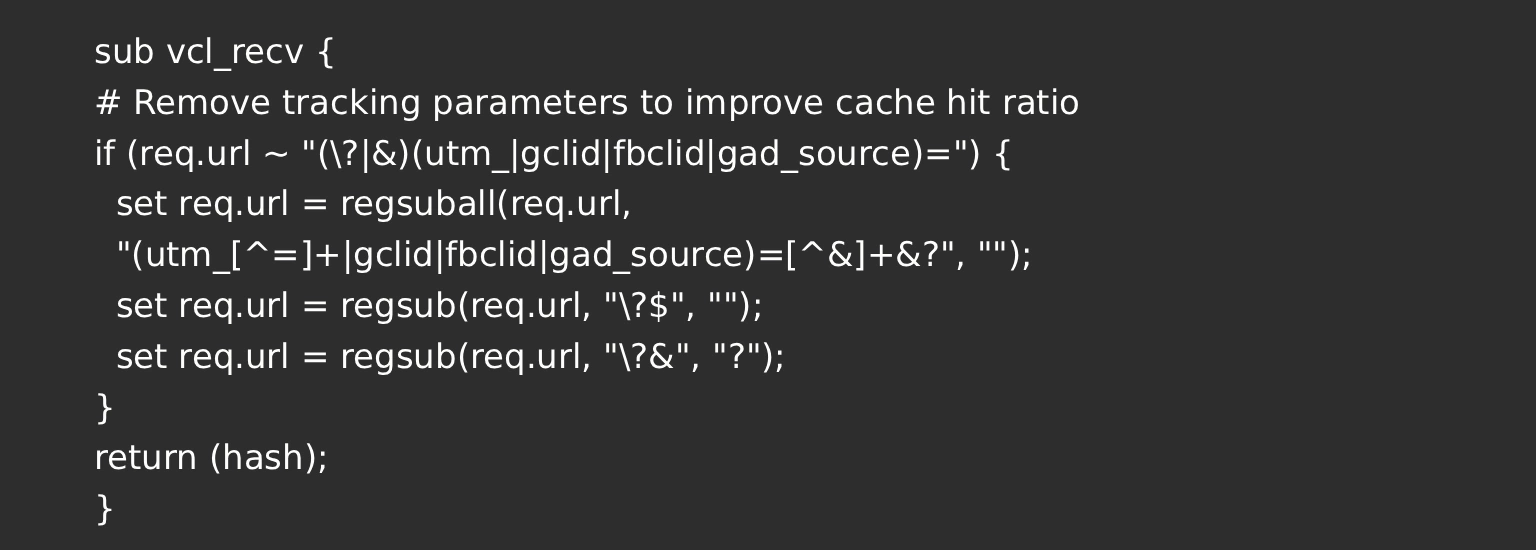
What This Does
Before normalization:
/product-123.html?utm_source=google
After normalization:
/product-123.html
Now all campaign traffic shares one single cache object in the Magento 2 Varnish Cache.
Instead of multiple cache misses, you get:
- One backend request
- All subsequent requests served from cache
- Higher hit ratio
- Lower CPU usage
Why This Matters in Magento 2
Magento 2 is powerful but resource-intensive. Every cache miss triggers:
- Full Magento bootstrap
- Database queries
- Layout rendering
- Block processing
If your hit ratio is 60%, then 40% of traffic hits PHP and MySQL.
If you push it to 90%, only 10% reaches the backend.
That means:
- Faster response times
- Lower server load
- Better stability during traffic spikes
- Reduced infrastructure cost
And all of this without changing Magento code, simply by improving the Magento 2 Varnish Cache configuration, helping achieve better Magento Performance Optimization.
The Core Principle
Varnish hashes:
- URL
- Selected headers
If the URL differs even slightly it becomes a new cache entry.
Tracking parameters like:
- utm_source
- gclid
- fbclid
- gad_source
do not change page content. They are only for analytics and attribution.
Removing them in vcl_recv ensures identical content generates identical cache objects, improving the Magento 2 Varnish Cache hit ratio.
Final Takeaway
If you’re running Magento 2 with Varnish and not normalizing tracking parameters, you’re losing Magento 2 Varnish cache efficiency without realizing it.
By cleaning URLs inside vcl_recv, you:
- Eliminate cache fragmentation
- Improve hit ratio significantly
- Reduce backend pressure
- Improve overall store performance
Sometimes, a small configuration change delivers the biggest performance improvement and in Magento 2 + Varnish setups, vcl_recv is exactly that opportunity.
We build high-performing Magento stores and optimize Varnish for maximum efficiency. Happy to connect and discuss no commitment required.

















