 Skip to content

Table of Contents
-
- Don’t Exclude /rest/ Entirely
- Explicitly Allow Customer & Checkout APIs
- Split Traffic into Three Buckets
- Don’t Rely Only on Multi-Parameter Detection (?&)
- Add Rules for Single Heavy Parameters
- Tune Limits Based on Traffic Type
- Example: Magento-Aware REST Rate Limit Configuration
- Performance Check: What You Should Evaluate
- Final Thought
Reduce Peak Load by 60% with These Nginx Rate Limit Rules for Magento
If you are running a high-traffic Magento store, rate limiting isn’t optional anymore it’s essential. As traffic scales, so does the risk of resource exhaustion whether from bots, aggressive crawlers, or even legitimate users hitting heavy endpoints repeatedly. The problem is, most implementations get it wrong. They either over-block real users (breaking checkout and login flows) or leave critical APIs completely exposed.
What you need is a balanced, Magento-aware rate limiting strategy, one that protects your infrastructure without hurting conversions. Here’s a practical, production-friendly approach.
Don’t Exclude /rest/ Entirely
One of the most common mistakes in Magento setups is excluding /rest/ endpoints from rate limiting altogether. On the surface, it feels safe after all, these APIs power essential frontend features.
But here’s the reality:
Product listings, category data, layered navigation, and search requests all rely on /rest/. If you leave this layer unprotected, bots will discover and exploit it quickly. These endpoints are predictable, easy to crawl, and often hit your database or Elasticsearch directly.
Skipping rate limiting here doesn’t protect users it exposes your backend to unnecessary load.
Explicitly Allow Customer & Checkout APIs
While /rest/ needs protection, not all APIs should be treated equally. Some endpoints are critical to the customer journey and must remain responsive at all times.
You should explicitly exclude the following endpoints from rate limiting:
- /customers/me
- /carts/mine
- /guest-carts
- /orders
- /shipping-information
- /payment-information
These APIs power login sessions, cart operations, and checkout flows. If you throttle them, you’re not protecting your server you are directly impacting revenue.
The goal is not blanket restriction, but intelligent control. Protect high-load endpoints while ensuring transactional APIs remain smooth.
Split Traffic into Three Buckets
A clean and effective strategy is to divide incoming traffic into three logical categories:
1. Normal Pages (Light Limit)
Standard CMS pages, product pages, and basic navigation. These are relatively lightweight and should have relaxed limits to avoid affecting user experience.
2. Query-Based URLs (Stricter Limit)
These include filtered category pages, search results, and URLs with parameters. These requests are heavier because they trigger dynamic queries and often bypass caching layers.
3. REST APIs (Controlled Limit)
APIs that serve dynamic content like products, categories, and search. These should have moderate but enforced limits.
This segmentation ensures that each type of request is handled according to its impact on system resources, rather than applying a one-size-fits-all rule.
Don’t Rely Only on Multi-Parameter Detection (?&)
Many rate-limiting setups focus only on URLs with multiple parameters (e.g., ?color=red&size=xl). While these are indeed heavy, this approach misses a critical detail:
Single-parameter URLs can be just as expensive.
For example:
- A simple search query (?q=shoes)
- Pagination (?p=5)
- Large product lists (?product_list_limit=100)
Each of these can trigger expensive backend operations, especially when uncached. Ignoring them creates a blind spot in your rate limiting strategy.
Add Rules for Single Heavy Parameters
To close that gap, explicitly target high-impact single parameters. These are frequently abused and often overlooked:
- ?q= → Search queries (can hammer Elasticsearch)
- ?p= → Pagination (deep page crawling)
- ?product_list_limit= → Large product loads
- ?cat= → Category filtering
These endpoints may look harmless individually, but under repeated access, they can significantly increase load on your database and search engine.
By identifying and controlling these patterns, you prevent inefficient crawling and reduce unnecessary backend stress.
Tune Limits Based on Traffic Type
Not all traffic should be treated equally. The key to effective rate limiting is tuning thresholds based on how resource-intensive the request is.
A practical approach:
- Normal Pages → Relaxed limits (to maintain UX)
- Filters/Search → Stricter limits (to control query load)
- REST APIs → Moderate limits (balanced protection)
This ensures that high-cost operations are controlled without disrupting standard browsing behavior.
Example: Magento-Aware REST Rate Limit Configuration
Here’s a clean and effective Nginx configuration that applies these principles:
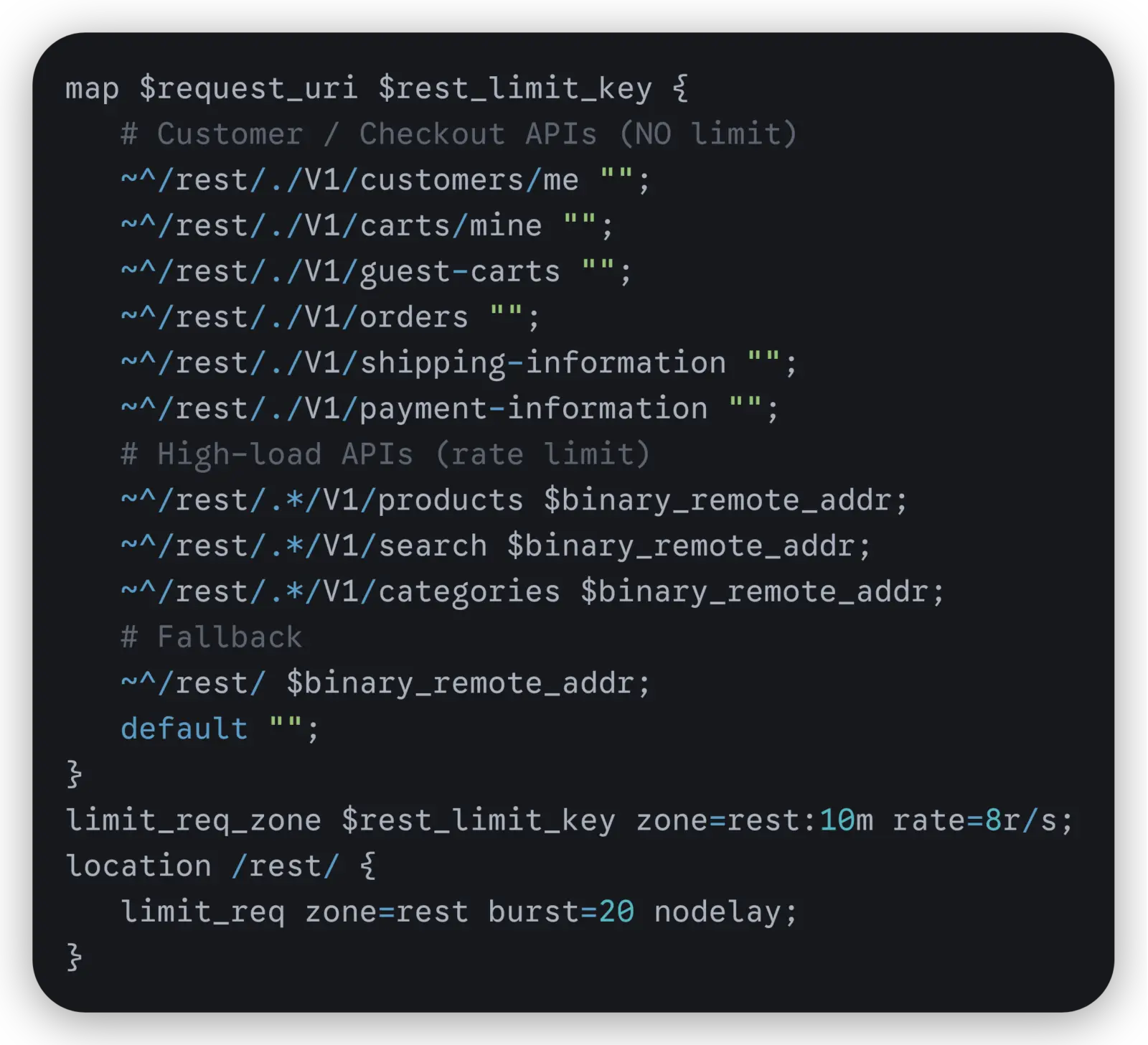
This configuration does three important things:
- Excludes critical checkout APIs from throttling
- Applies limits to high-load endpoints like product and search APIs
- Ensures all other REST traffic is still controlled via fallback
It’s simple, readable, and production-safe.
Performance Check: What You Should Evaluate
Before and after implementing rate limiting, ask yourself:
- Are your REST APIs protected or still exposed?
- Are search and filter requests overwhelming your database or Elasticsearch?
- Are real users experiencing throttling during checkout or login?
These checks help ensure your rules are working as intended not just technically, but from a business perspective.
Final Thought
Good rate limiting isn’t about blocking traffic it’s about shaping it intelligently.
A well-structured approach can reduce peak load by a significant margin without hurting user experience. The difference lies in understanding how Magento behaves under load and applying controls where they matter most.
The real question is:
Are you protecting the right endpoints or just limiting traffic blindly?

















