Skip to content

Table of Contents
- Choose the Right Execution Model Early
- Avoid Runtime Admin API Calls
- Prefer Shopify Functions for Real-Time Logic
- Bulk Operations Over Pagination
- Never Use Mutation Loops
- Design for Asynchronous Processing
- Cache Aggressively
- Treat Rate Limits as a Core Constraint
- Optimize Storefront Touchpoints
- Measure the Right Signals
- The App Developer’s Performance Review Checklist
Building Shopify Apps with Performance in Mind: The Deep Dive
Performance in Shopify apps is largely determined by execution choices. Most slow apps rely on runtime APIs where native, bulk, or precomputed approaches would be significantly faster. This deep dive translates core rules into code-heavy examples, real production benchmarks, and provides a Performance Review Checklist.
1. Choose the Right Execution Model Early
- Admin API: Subject to network latency and strict rate limits.
- Native Runtime (Functions): Executes directly inside the Shopify platform via WebAssembly.
- External Orchestration: Introduces multi-hop latency and failure points.
Production Benchmark
- External Webhook (Node.js/AWS): ~200ms – 2,500ms latency (network + cold starts).
- Shopify Function (Rust/WASM): ≤ 5ms execution time, 0ms network latency.
Takeaway: Native execution consistently delivers the lowest runtime overhead. Use Functions whenever extending checkout or cart logic.
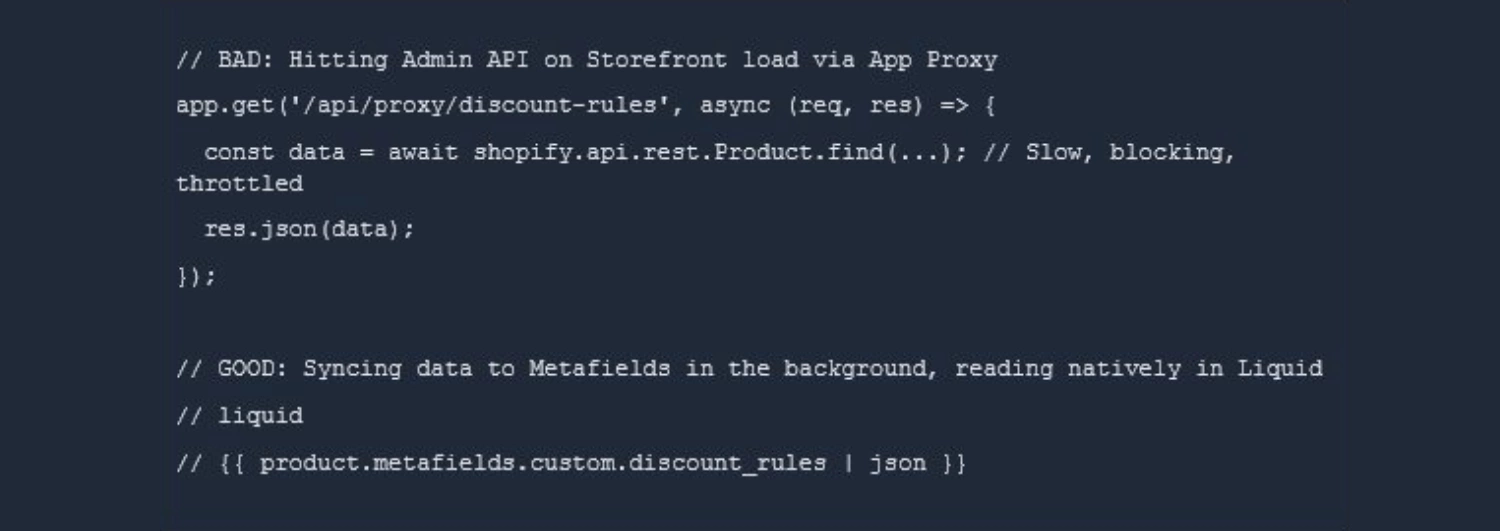
2. Avoid Runtime Admin API Calls
API dependency chains: Result in cascading latency affecting the merchant’s store.
Production Benchmark
- Runtime Admin API Call (Storefront): ~300ms + risk of hitting 429 rate limits.
- Cached Metafields (pre-injected): ~0ms (loads instantly with the DOM).
Node.js / Liquid – Bad vs Good Architecture
3.Prefer Shopify Functions for Real-Time Logic
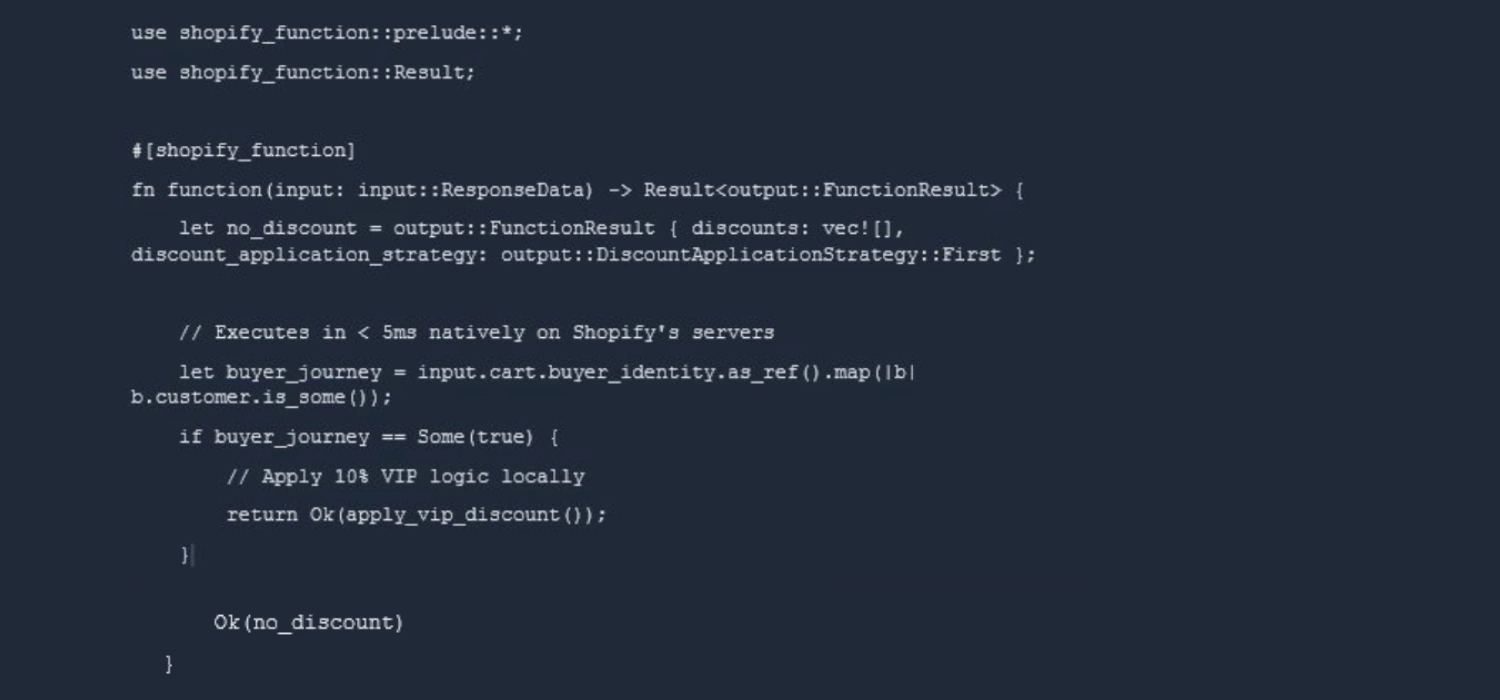
- Discount API: Requires a network call per cart evaluation.
- Discount Function: Executes securely and natively inside checkout.
Rust – Discount Function
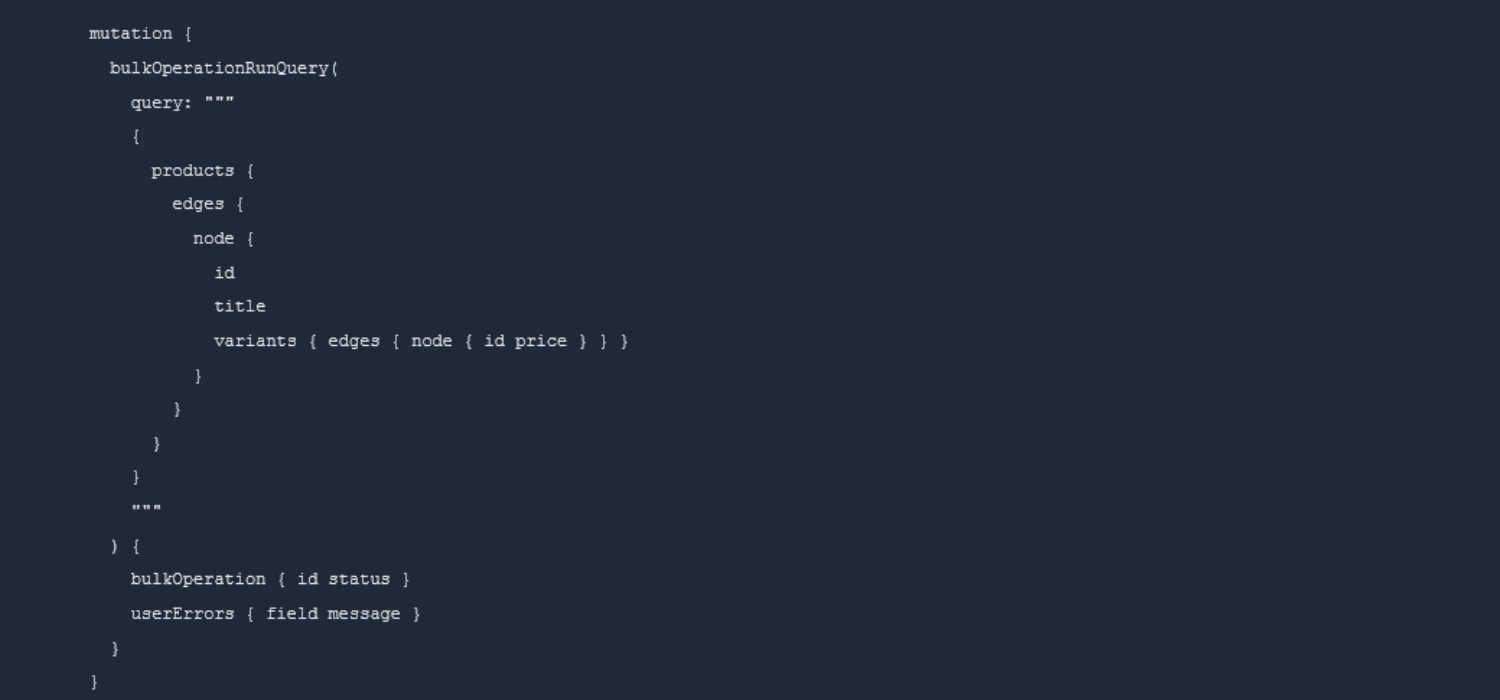
4. Bulk Operations Over Pagination
Pagination: Inherits multiple network round trips and accumulating GraphQL cost points.
Bulk Operations: Condenses data extraction into a single asynchronous job.
Production Benchmark
- Paginating 50K Products: ~200 requests, consumes massive bucket points, takes ~5-10 minutes.
- Bulk Operation: 1 API request (10 pts), completes asynchronously, returns single JSONL file.
GraphQL – Bulk Query Mutation
5. Never Use Mutation Loops
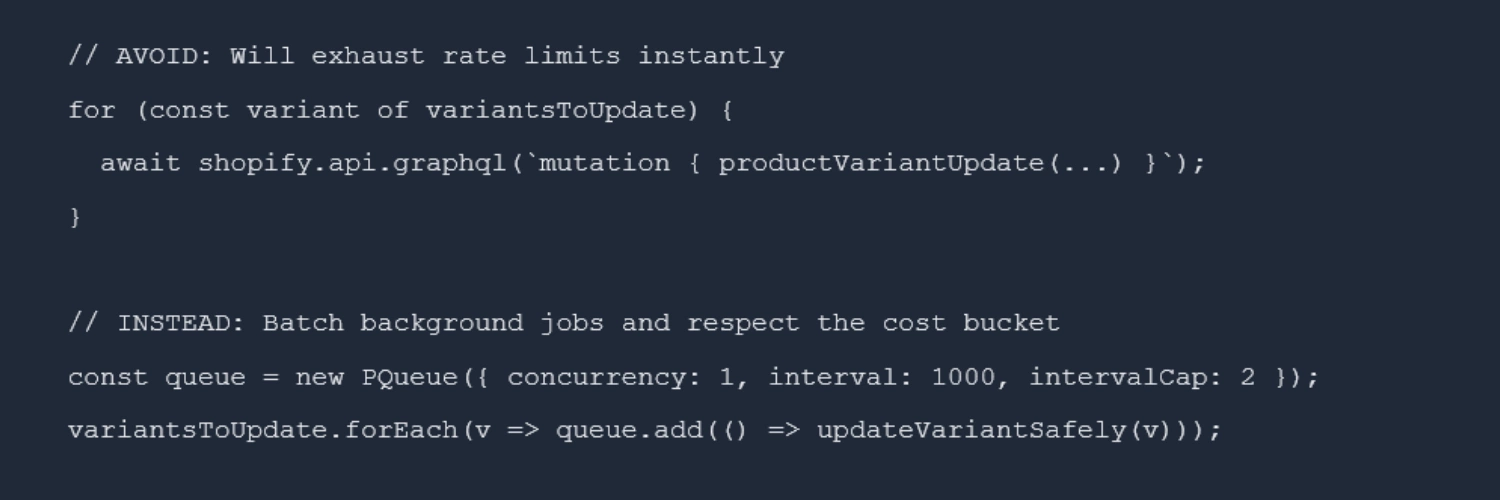
Variant update loops: Cause N API writes, amplifying rate limits and risking cache invalidation.
Node.js – The Danger of Loops
6. Design for Asynchronous Processing
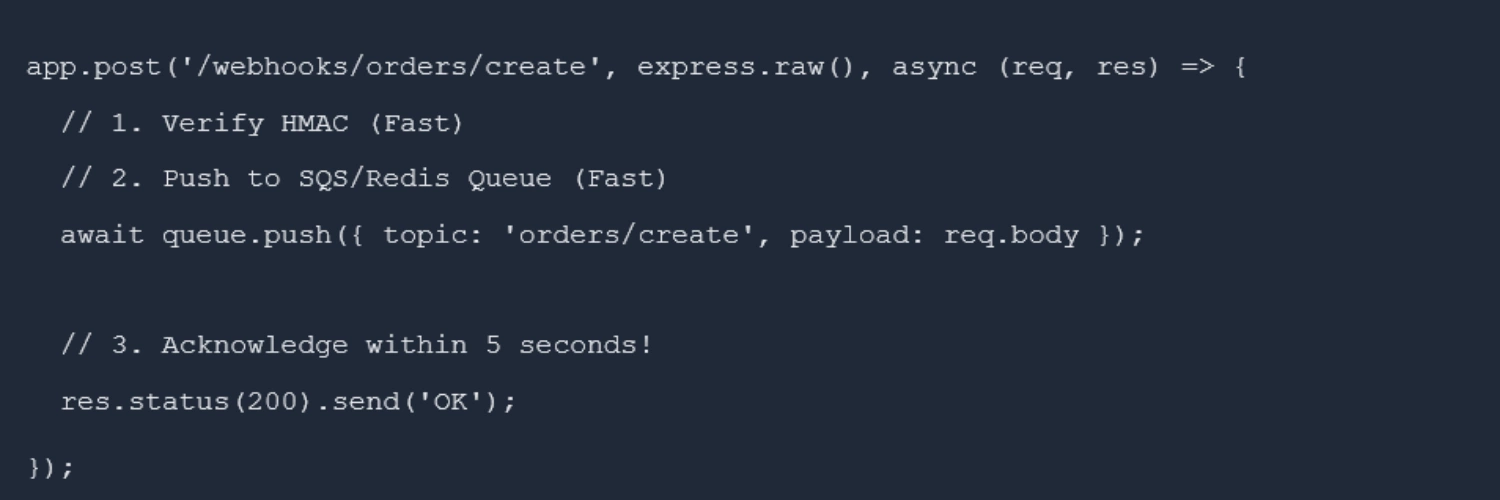
Synchronous webhooks: Create fragile scaling architectures.
Queues: Provide load smoothing, retries, and stability.
Production Benchmark
- Synchronous processing: Fails if DB query takes > 5s (Shopify drops the webhook).
- Asynchronous (e.g., SQS): Acknowledges webhook in < 50ms, processes safely.
Express.js – Fast Webhook ACKs
7. Cache Aggressively
- Live API reads: Incur repeated network latency and drain point buckets.
- Cached configs: Provide microsecond access and prevent redundant API cost.
Production Benchmark
- Database / API Read: ~150ms
- Redis Cache Hit: ~2ms
8. Treat Rate Limits as a Core Constraint
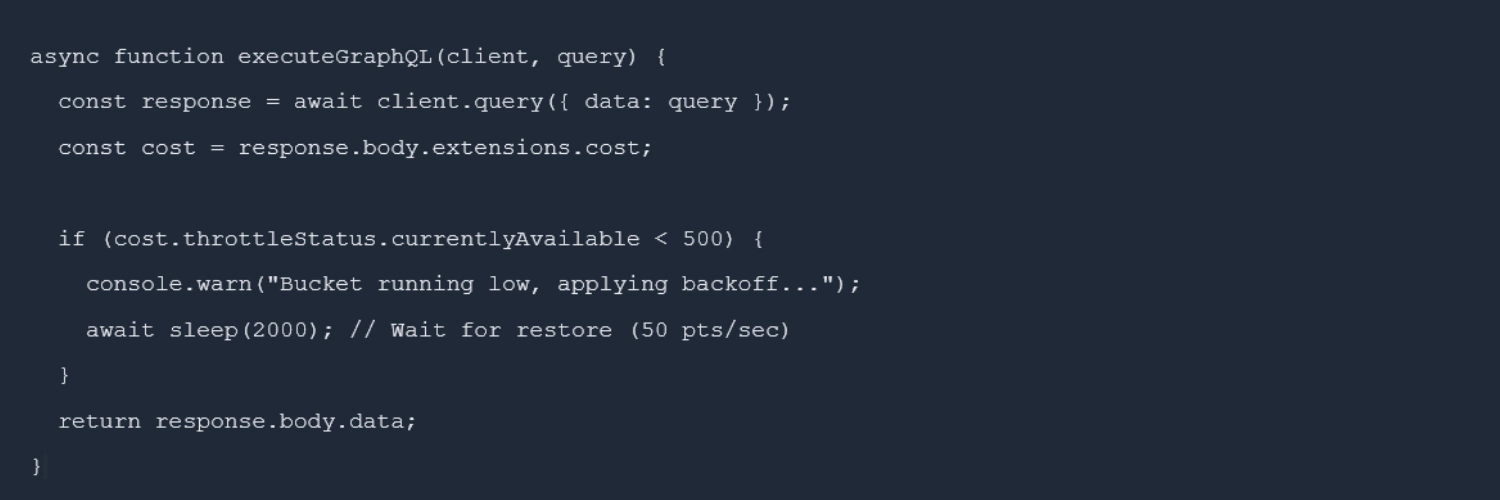
Token bucket throttling (REST) & Cost-based (GraphQL): Requires stable throughput management.
JavaScript – Cost-Aware Execution
9. Optimize Storefront Touchpoints
Takeaway: Storefront performance thrives on zero-runtime logic. Rely on CDN-cached assets, Metafields, and edge-computed responses. Ensure you monitor webhook queue depths and GraphQL Point Consumption to proactively catch scaling bottlenecks.
10. Measure the Right Signals
Queue depth: Early scaling indicator. Observability: Enables targeted optimization. Track extensions.cost.actualQueryCost on every GraphQL request to prevent blind scaling.
The App Developer’s Performance Review Checklist
Before deploying any Shopify App to production, run it through this architectural checklist:.
- API Call Minimization: Are there any loops making sequential API mutations? (If yes, move to a background queue).
- Data Extraction: Are backend processes pulling more than 250 records? (If yes, pivot to Bulk Operations).
- Webhook Idempotency: Do webhook handlers respond with 200 OK within 2 seconds by pushing the payload to an async queue?
- Rate Limit Readiness: Does the GraphQL client read the extensions.cost object and implement exponential backoff?
- Storefront JS Weight: Does your Theme App Extension inject less than 15KB of Render-blocking JavaScript?
- Checkout Latency: Have you replaced all legacy checkout REST API polling with native Shopify Functions (WASM)?
- Caching: Are merchant configurations cached in Redis/Memcached rather than hitting the primary DB on every storefront load?
- Monitoring: Do you have alerts configured for Webhook delivery failures and Shopify API 429 warnings?