oscpimage
osc logo
Automate SRE2026-07-28T03:40:44+00:00

Problem & Solution

The problem

Most uptime tools only say “site is down.” They don’t say if PHP-FPM crashed, MySQL stopped, Varnish failed, or a bad deploy broke the storefront.

For Magento and WordPress teams, that gap means longer downtime, lost orders, and guessing after every alert.

How that usually plays out:

  • Up / Down alert — but not which layer failed (web, PHP-FPM, DB, cache, proxy)
  • CPU, memory, disk, and service status live in another tool — or nowhere
  • Logs and metrics are separate — someone digs them after the fact
  • No plain-language root cause from real server data
  • Failed services stay down until someone restarts them by hand
  • Security signals stay outside monitoring — or never get checked

The solution

AutomateSRE is built for production LAMP/LEMP stacks — Magento and WordPress first. A lightweight agent ships health signals outbound over HTTPS.

When something breaks, monitoring and diagnosis stay in one place — so your team gets answers, not just red alerts.

What AutomateSRE does:

  • Detects the outage with continuous HTTP / HTTPS checks
  • Checks services on the server (Apache/Nginx, PHP-FPM, MySQL, Redis, Varnish, and more)
  • Correlates logs + metrics into one clear diagnosis
  • Uses AI to explain the root cause in plain language
  • Lets you ask questions in chat — “is my site down?”, “why was it down?”, traffic and CPU answers from your live data
  • Alerts by email (and Telegram if configured) plus daily security reports

You get answers — not just alerts.

Key Features

Uptime Monitoring

24/7 Uptime Monitoring

Continuous HTTP/HTTPS checks with clear Up / Down status and alert history.

Service Diagnostics

Service Diagnostics

Identifies which layer failed: web server, PHP-FPM, database, cache, or reverse proxy.

AI Root Cause Analysis

AI Root Cause Analysis

LLM-powered analysis from real server signals — so your team knows what to fix first.

Daily Security Reports

Daily Security Reports

Security posture checks for registered sites: suspicious traffic patterns, file integrity signals, SSL status, and more.

Admin Modules

Admin Modules

Optional Magento 2 and WordPress admin modules show AutomateSRE status and alerts inside the store admin (read-only).

Lightweight Agent

Lightweight Agent

A small agent installs with a copy-paste command. It ships data out over HTTPS — no inbound ports to open, no shared SSH passwords required for monitoring.

Built for Magento & WordPress teams

AutomateSRE is designed for the stacks OSC Professionals already supports:

  • Magento / Adobe Commerce
  • WordPress / WooCommerce
  • Custom PHP on Apache or Nginx

Ideal for merchants, agencies, and ops teams who need production monitoring without a full in-house SRE team.
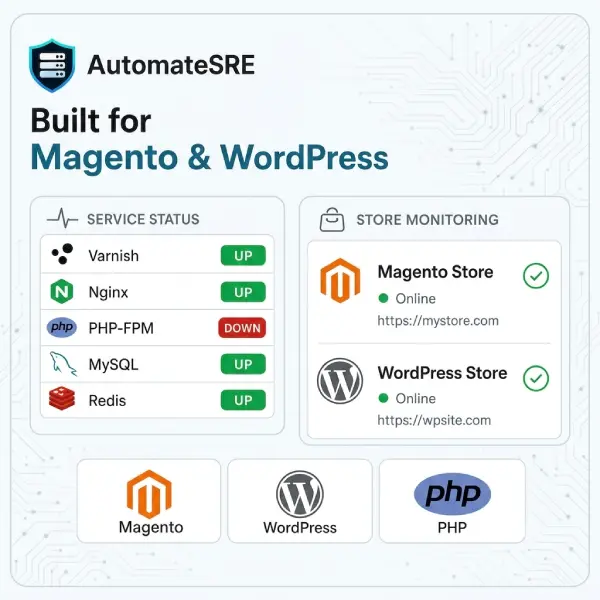
build for magento
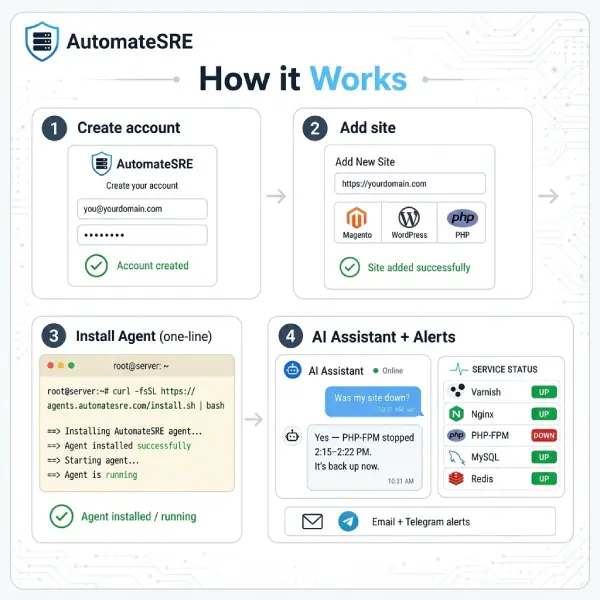
how it work

How it Works

  1. create an account at www.automatesre.com
  2. Add Your Site
  3. Install the agent on full-tier services (one command)
  4. Get alerts when something goes wrong – with root cause, not just “DOWN”

Optional: install the Magento or WordPress admin module and paste your site API key to see status inside the admin panel.

FAQ

Is AutomateSRE only for Magento?2026-07-16T03:40:04+00:00

No. It works for Magento, WordPress, and other PHP sites on LAMP/LEMP. Magento and WordPress get the deepest day-to-day fit.

Do I need to open firewall ports?2026-07-16T03:40:22+00:00

No. The agent connects outbound over HTTPS.

Does the Magento module change my store?2026-07-16T03:40:28+00:00

No. It is read-only — configuration + dashboard only. Magento 2.4.0+.

Is there a free plan?2026-07-16T03:40:34+00:00

Yes. Basic uptime monitoring is free.

Can you help us install it?2026-07-16T03:40:42+00:00

Yes. Book a demo or guided setup — we’ll help you get monitoring live.

Stop guessing when your store goes down.

Start with free uptime monitoring, or go Full for AI root cause.

Go to Top