Skip to content

Table of Contents
- Introduction
- Infrastructure Cost Optimization
- Infrastructure Overview Before Migration
- Infrastructure Overview After Migration
- Varnish Optimization
- Our VCL Optimization
- WAF Configuration
- Correct Invalidation using private_content_version
- Proper Use of section_data_ids
- Performance Improvement: Reduced Average Response Time
- What Contributed to This Improvement?
Magento Performance Optimization Case Study
Introduction
About the Project
Our client operates a large Magento 2 eCommerce platform serving customers across the USA and Canada. The store manages an extensive product catalog, customer accounts, and personalized shopping experiences, making performance, scalability, and reliability critical to daily operations.
As the business continued to grow, the existing infrastructure required optimization to improve response times, reduce server load, and provide a more stable shopping experience during peak traffic.
Our objective was not only to improve website performance but also to ensure that Magento’s seamless customer experience remained unaffected. Features such as customer login status, cart information, wishlist, and auto-populated customer details needed to continue working seamlessly while maximizing Full Page Cache (FPC) efficiency.
Project Objectives
The primary goals of this optimization project were:
- Improve Magento 2 application performance.
- Maintain seamless customer experiences without compromising cache efficiency.
- Reduce unnecessary requests reaching the Magento application.
- Build a scalable infrastructure capable of handling higher traffic.
Optimize infrastructure costs while maintaining production stability.
Infrastructure Cost Optimization
Before beginning the application-level performance optimization, we first evaluated the hosting infrastructure.
The client was running their Magento environment on a higher-cost infrastructure, where server resources were not being utilized efficiently. To improve cost efficiency without affecting production workloads, we migrated the environment to a more optimized DigitalOcean infrastructure.
This migration significantly( 22% ) reduced monthly hosting costs while providing a stable foundation for the performance improvements implemented in later stages.
Infrastructure Overview Before Migration
The original environment consisted of a production server hosting the live PSBM USA & Canada Magento website.
Before Migration
| Environment | Description | Hosting Provider | Server Role | Key Components |
|---|---|---|---|---|
| Server 1 | Live Production Store | Previous Hosting Infrastructure | Production Server | Nginx, PHP-FPM, MySQL, Elasticsearch, Redis, Varnish, SSL/TLS |
| Server 2 | Development & UAT | Previous Hosting Infrastructure | Development Server | Nginx, PHP-FPM, MySQL, Elasticsearch, Redis, Varnish |
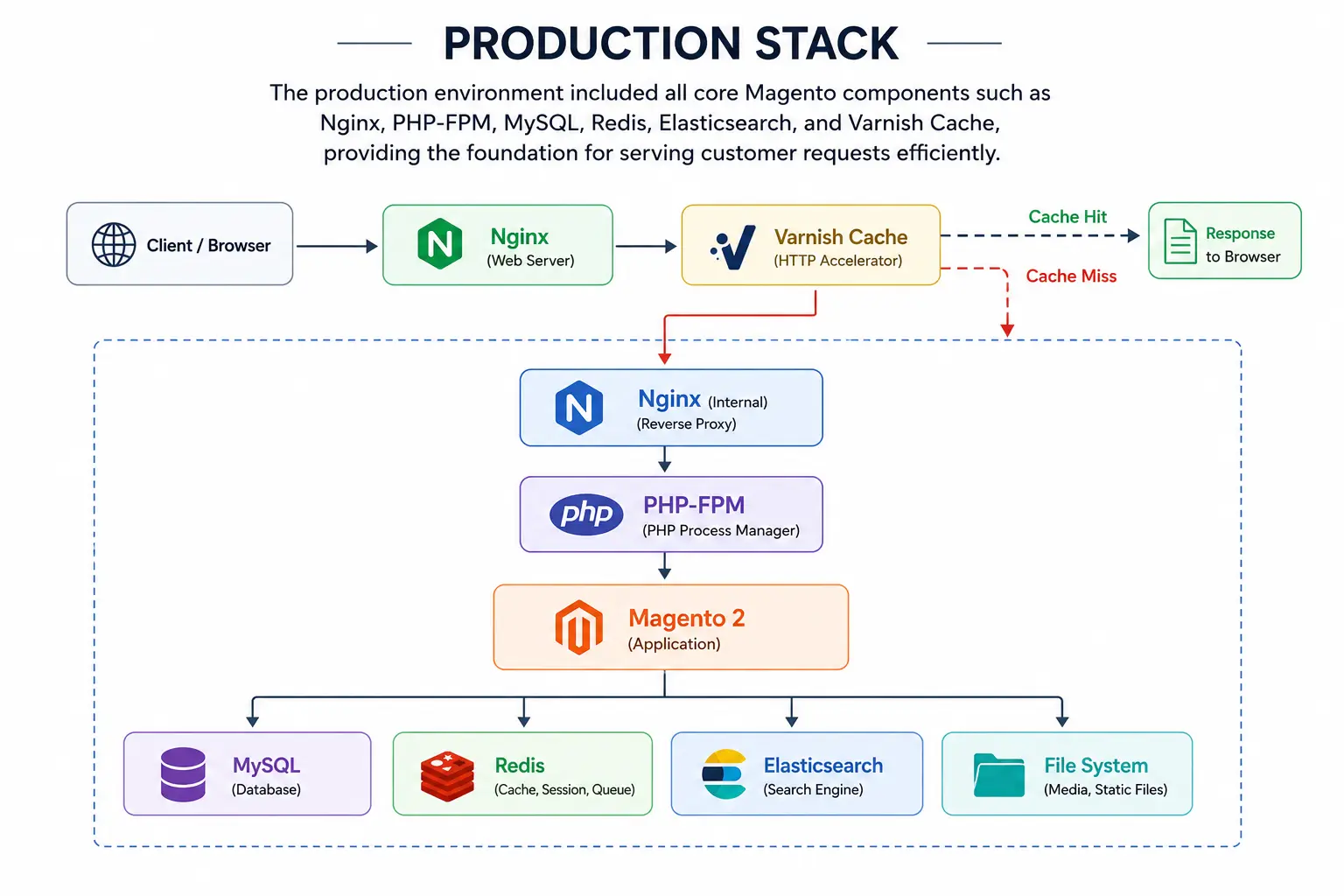
Production Stack:
The production environment included all core Magento components such as Nginx, PHP-FPM, MySQL, Redis, Elasticsearch, and Varnish Cache, providing the foundation for serving customer requests efficiently.
Infrastructure Overview After Migration
Following the migration, the infrastructure was restructured to provide a clear separation between Magento development and production workloads while maintaining a consistent technology stack across both environments.
After Migration
| Environment | Description | Hosting Provider | Server Role | Key Components |
|---|---|---|---|---|
| Server 3 | Development & UAT Environment | Optimized Hosting Infrastructure | Development & Testing | Nginx, PHP-FPM, MySQL, Elasticsearch, Redis, Varnish, SSL/TLS |
| Server 4 | Live Production Store | Optimized Hosting Infrastructure | Production Server | Nginx, PHP-FPM, MySQL, Elasticsearch, Redis, Varnish, SSL/TLS |
This restructuring provided a more organized environment for development, testing, and future enhancements while maintaining the same reliable technology stack across environments.
The migration also established a stronger infrastructure foundation for the optimization work that followed.
Implementation Challenges
After migrating the infrastructure and establishing a stable hosting environment, we performed a detailed analysis of the Magento application to identify the root causes of its performance issues.
Although the server infrastructure had sufficient resources, our analysis revealed that the application was handling a significant number of unnecessary requests. These requests reduced Full Page Cache efficiency, increased the amount of PHP processing required by magento application, and placed additional load on Magento during periods of high traffic.
1. Infrastructure Health Analysis
To understand the server’s behavior, we monitored key infrastructure metrics over a seven-day period, including CPU utilization, memory usage, load average, disk I/O, disk usage, and bandwidth consumption. We also analyzed the web server access logs to better understand incoming request patterns.
Based on the monitoring data, the infrastructure was not resource-constrained. CPU utilization remained low for most of the observation period, memory usage was stable, disk I/O stayed within acceptable limits, and sufficient disk space was available throughout the analysis.
Resource Health Summary
| Metric | Observation |
|---|---|
| CPU Utilization | Mostly low with occasional spikes. |
| Memory Usage | Usage remained high for most of the week. |
| Load Average | Brief spikes observed during peak traffic periods. |
| Disk I/O | Within acceptable limits. |
| Disk Usage | Sufficient free storage available. |
| Bandwidth | Daily traffic spikes observed. |
Key Observation
The server had sufficient capacity to handle the workload. The primary performance bottleneck was the way requests were processed within the Magento application rather than any infrastructure resource limitations.
2. CPU Spikes on the Application Server
Although average CPU utilization remained relatively low, noticeable spikes were observed during periods of increased customer activity.
These spikes indicated that Magento was executing additional processing for requests that could potentially be served from cache.
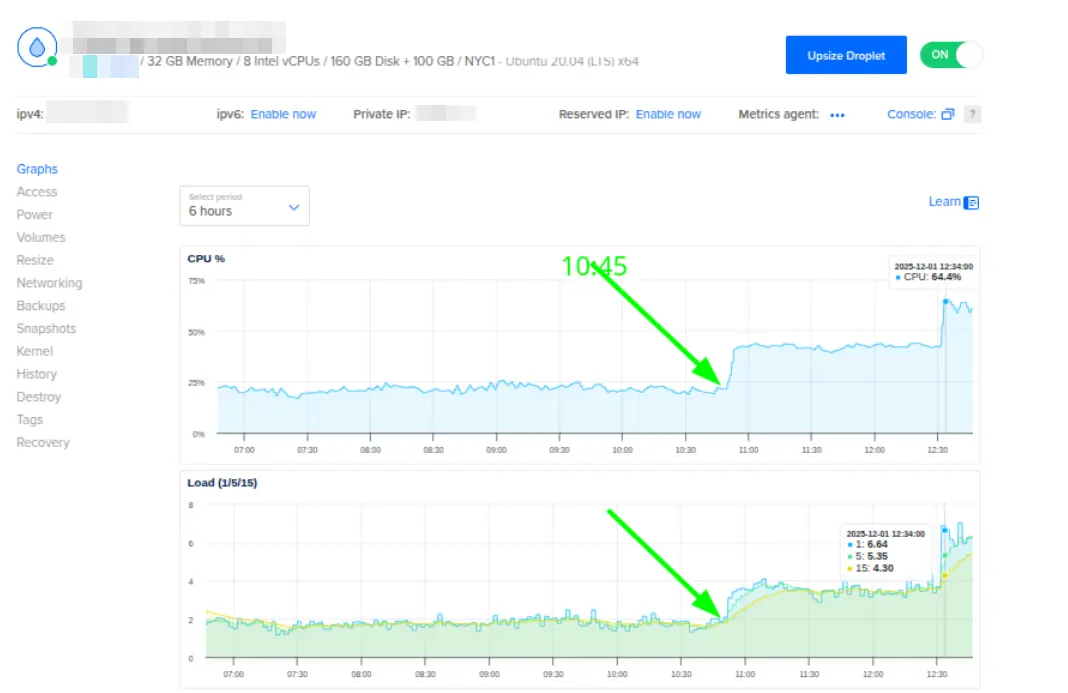
Instead of delivering cached responses, the application frequently processed requests through Magento executing pages using PHP, increasing CPU usage and response time.
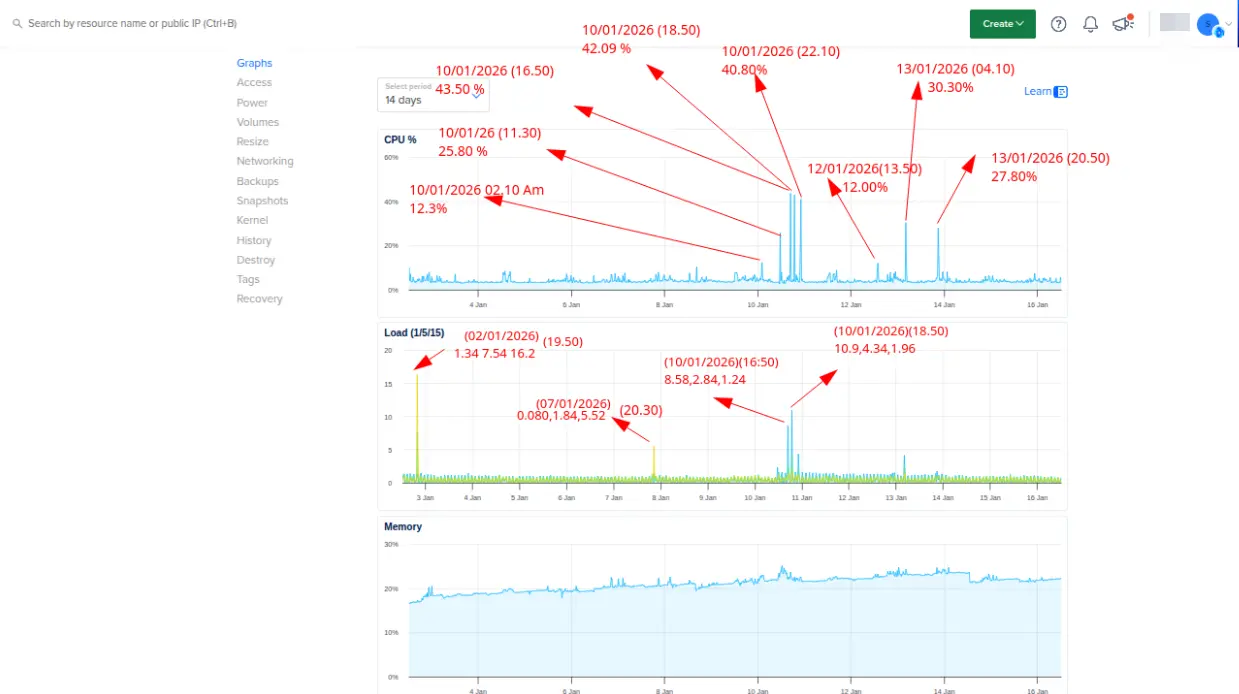
This became one of the primary indicators that request handling and caching required optimization.
3. High Number of Unnecessary Requests Reaching Magento
We also analyzed the server access logs to understand the nature of incoming requests.
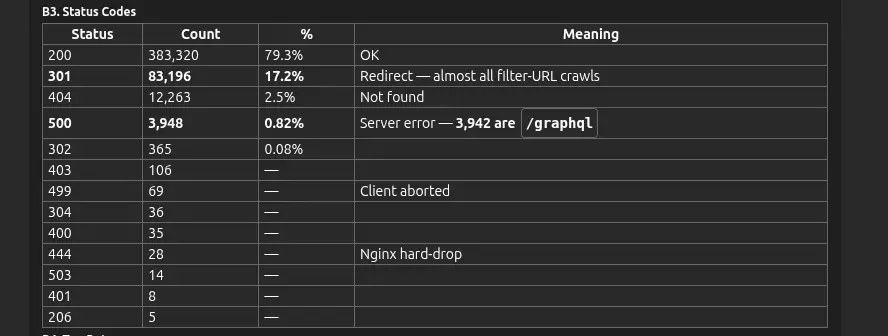
The HTTP status code distribution revealed several patterns that contributed to unnecessary application processing.
HTTP Status Code Analysis
Key Findings
- A large number of 301 Redirects indicated that many requests required additional processing before reaching the correct destination.
- Multiple 404 Not Found requests consumed server resources without providing value to customers.
- Several 500 Internal Server Errors, particularly from GraphQL requests, triggered unnecessary backend processing.
- These requests collectively increased the number of requests handled by Magento instead of being filtered or cached earlier in the request lifecycle.
4. Lower Varnish Cache Efficiency
Varnish was already deployed as the Full Page Cache layer, but its effectiveness was limited by the application’s request flow.
A significant number of requests bypassed the cache or required Magento to generate responses dynamically, reducing the overall cache hit ratio.
As a result:
- More requests were forwarded to PHP-FPM and Magento.
- Magento processed and generated dynamic responses more frequently.
- Backend CPU and PHP processing increased.
- Response times became less consistent during periods of high traffic.
5. Risk of Serving Stale Personalized Content
Magento pages contain both cacheable content and customer-specific information, such as:
- Shopping cart
- Customer login status
- Wishlist
- Recently viewed products
If customer-specific private content is not handled correctly, the application may either:
- Reduce Full Page Cache efficiency by generating pages dynamically, or
- Serve stale or incorrect personalized data within cached pages.
The challenge was to maximize Full Page Cache performance while ensuring that every customer continued to receive accurate, up-to-date personalized content.
6. Increased Server Load During Peak Traffic
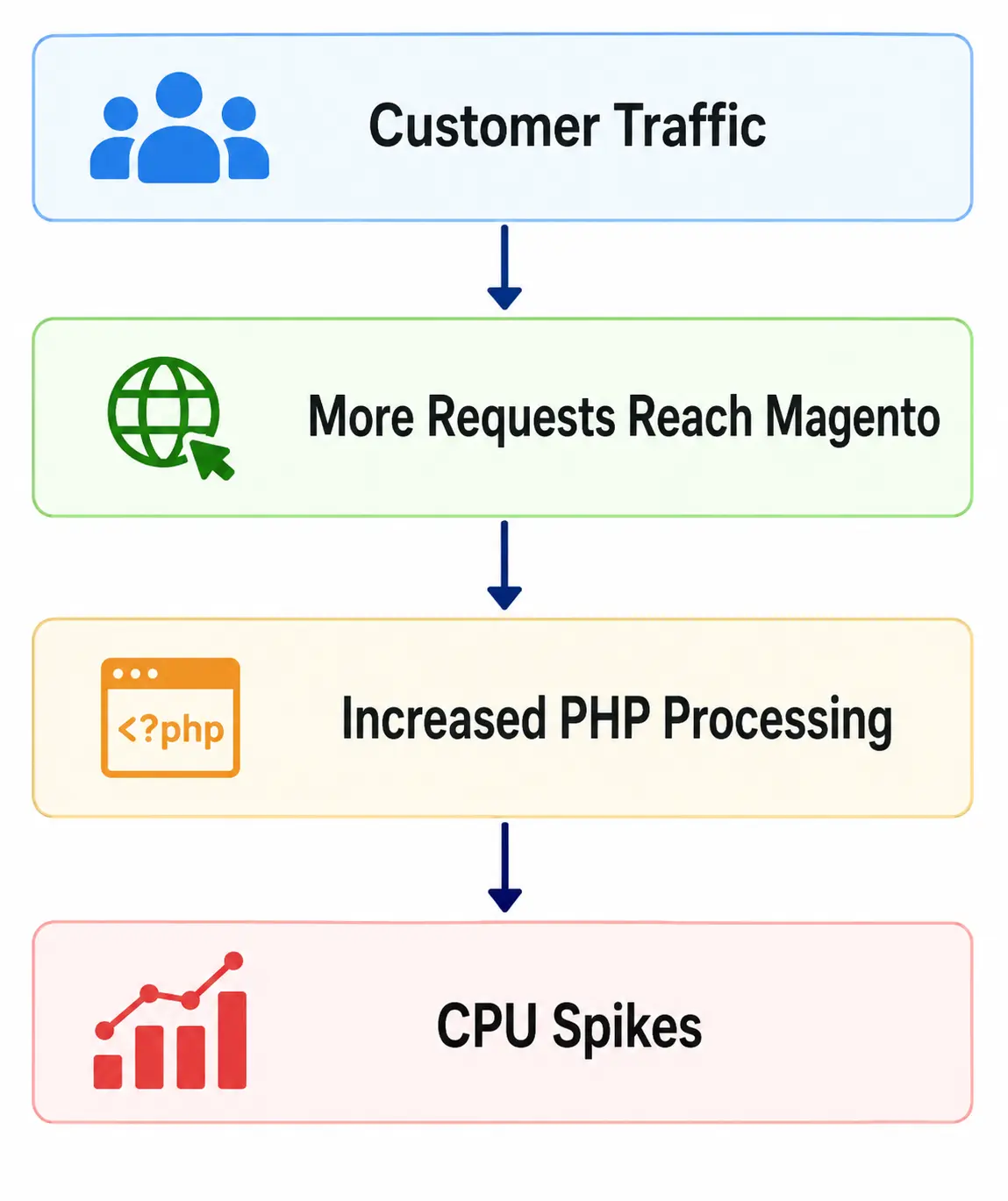
During high-traffic periods, all of these challenges combined to place an additional load on the application server.
The sequence looked similar to the following:
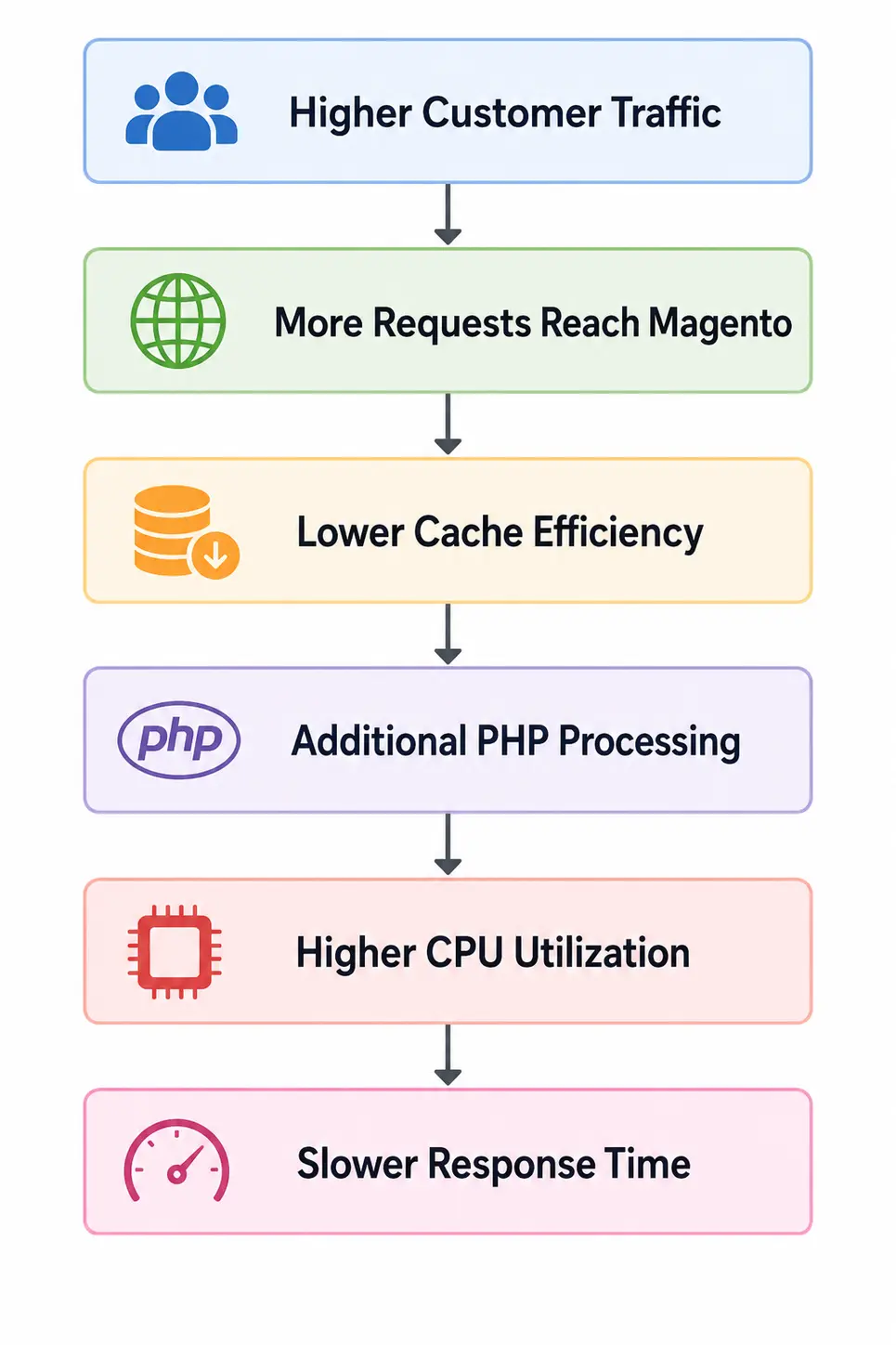
Although the infrastructure had sufficient capacity, inefficient request handling caused Magento to perform more work than necessary.This was due to the reason that lot of legacy url not used by users were hit by crawler and as these were not cached so the varnish hit ratio was down and PHP resource consumption plus DB related request spiked.
Varnish Optimization
One of the primary objectives of this project was to improve the efficiency of the Varnish Full Page Cache (FPC) by reducing the number of unnecessary requests reaching the Magento application.
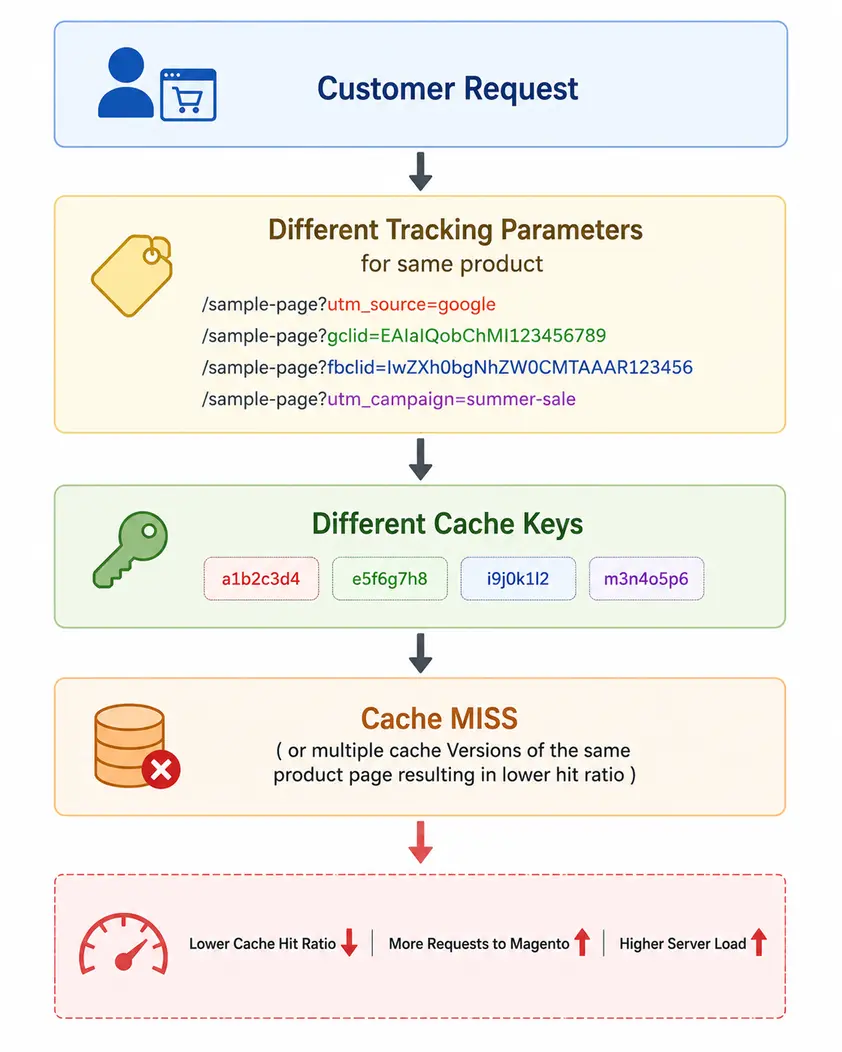
During our analysis, we found that many incoming requests included tracking and marketing query parameters such as UTM, GCLID, FBCLID, MSCLKID, and other campaign identifiers. Although these parameters did not affect the actual page content, Varnish treated each URL containing different query parameter values as a unique cache key, resulting in unnecessary cache misses.
Problem Before Optimization
Consider the following URLs:
https://shop.example.com/electronics/wireless-headphones https://shop.example.com/electronics/wireless-headphones?utm_source=google&utm_medium=cpc https://shop.example.com/electronics/wireless-headphones?gclid=EAIaIQob… https://shop.example.com/electronics/wireless-headphones?fbclid=IwZXh0bgNh… https://shop.example.com/electronics/wireless-headphones?msclkid=4d8a9f7b1234
https://shop.example.com/electronics/wireless-headphones?brand=abc&color=black&noise_cancelling=true&price=500-2000
Although all four URLs display the same product page, Varnish considered them as separate cache objects.
This caused:
- Lower cache hit ratio.
- More requests forwarded to Magento.
- Increased PHP processing.
- Higher CPU utilization during peak traffic.
Before Optimization
Our VCL Optimization
To improve cache efficiency, we updated the Varnish Configuration Language (VCL) rules to normalize incoming URLs before cache lookup.
1. Removing Marketing & Tracking Parameters
We configured Varnish to automatically remove common tracking parameters that do not affect page content, including:
- utm_*
- gclid
- fbclid
- msclkid
- mc_*
- cx
- ie
- cof
- siteurl
- zanpid
- Origin
- color=*&size=*&thickness=*&qty_
case=* and other campaign-specific parameters
After removing these parameters, multiple versions of the same URL were normalized into a single cacheable URL.
Example:
https://www.example.com/packaging/poly-mailers?utm_source=google&utm_campaign=summer-sale
▼
https://www.example.com/packaging/poly-mailers
This significantly improved cache reuse across customer requests.
2. Handling Dynamic Query Parameters
Certain requests contained query parameters that generated dynamic or real-time responses and therefore were not suitable for Full Page Cache.
To ensure these requests were always processed by Magento, we configured Varnish to bypass the cache using return(pass) for specific application scenarios.
Examples included:
- Stock-related requests
- Portal-specific parameters
- Application-specific parameters that required real-time processing
This approach ensured that dynamic requests were always served with up-to-date data, while cacheable requests continued to benefit from Varnish, maximizing overall cache efficiency.
Request Flow After Optimization
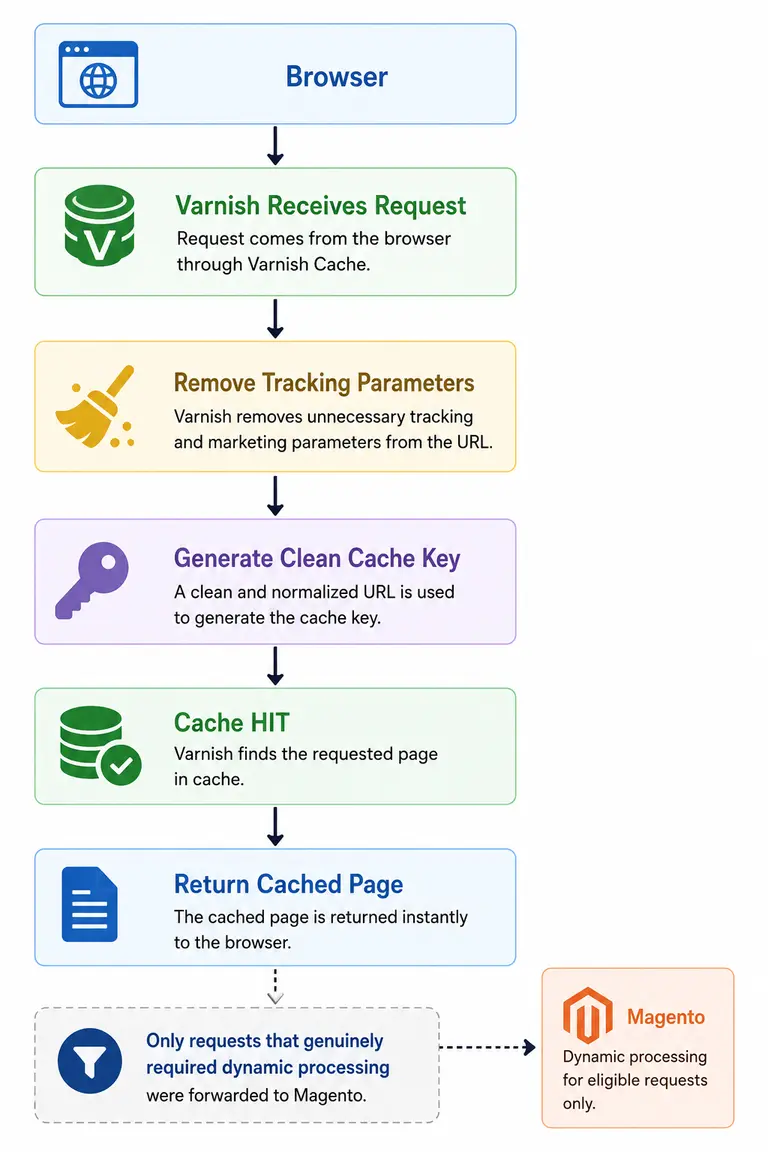
Only requests that genuinely required dynamic processing were forwarded to Magento.
Benefits Achieved
The Varnish optimization delivered several improvements:
- Higher Full Page Cache hit ratio.
- Fewer unnecessary requests reaching Magento.
- Reduced PHP-FPM processing.
- Lower CPU utilization on the application server.
- Faster response times for repeat visitors.
- Better utilization of server resources during high traffic.
By normalizing URLs and filtering unnecessary query parameters at the caching layer, we ensured that Varnish served a significantly larger percentage of requests directly from cache, allowing Magento to focus only on requests that truly required application-level processing.
WAF Configuration
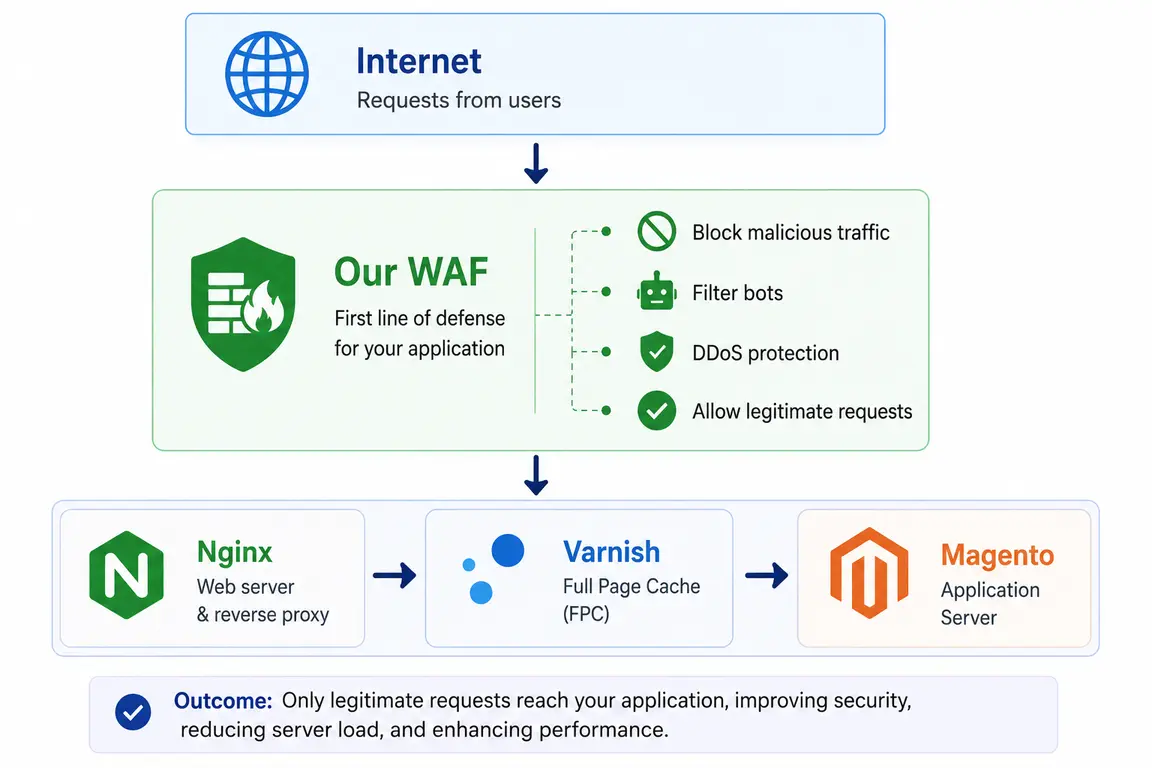
To further improve the security and performance of the Magento application, we implemented a Web Application Firewall (WAF) at the domain level. The WAF acts as the first layer of defense, filtering malicious and unnecessary traffic before it reaches the web server.
Request Flow
WAF Enhancements Implemented
The following security and traffic filtering rules were configured:
- Enabled Web Application Firewall (WAF) for protection against DDoS attacks, malicious requests, and common web vulnerabilities.
- Configured country-based access control, allowing traffic only from the United States, Canada, and India.
- Added custom firewall rules to secure Magento Admin and REST/API endpoints.
- Enabled Bot Fight Mode and Browser Integrity Check to reduce unwanted bot traffic.
- Verified DNS and SSL/TLS configurations to ensure secure communication between users and the Magento application.
Insert Figure: WAF Configuration Overview
Benefits Achieved
By implementing the WAF, we were able to:
- Block malicious and unwanted traffic before it reached the application.
- Reduce unnecessary requests processed by Nginx and Magento.
- Improve overall website security against common web attacks.
- Minimize server load caused by bots and suspicious requests.
- Ensure that only legitimate customer traffic reached the application.
This additional security layer complemented our Varnish optimization by reducing unnecessary backend processing and helping maintain a more stable and secure Magento environment.
Correct Invalidation using private_content_version
Magento uses a smart mechanism to keep Full Page Cache (FPC) highly efficient while ensuring customers always see their latest personalized information.
Instead of regenerating the entire page whenever customer data changes, Magento uses private_content_version as a global invalidation signal.
Whenever a customer performs actions such as:
- Login or logout
- Add a product to the cart
- Update the wishlist
- Complete the checkout
Magento generates a new private_content_version, indicating that customer-specific content needs to be refreshed.
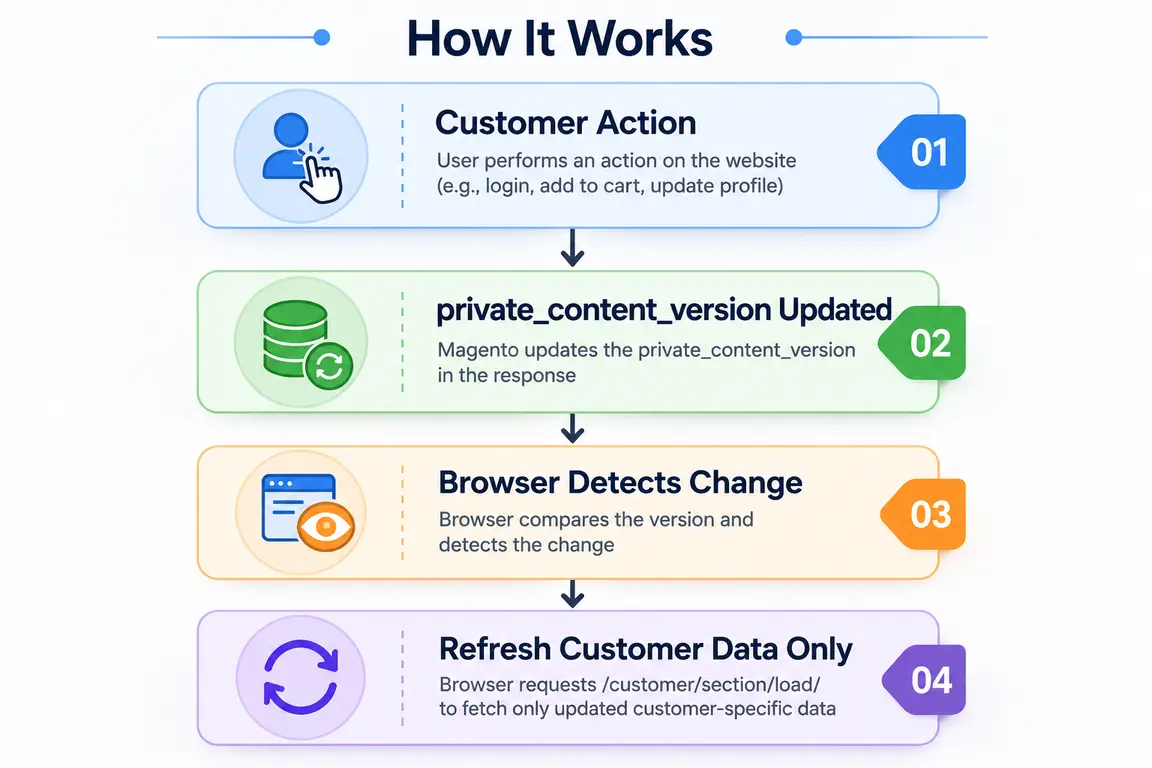
This approach allows the cached page to remain unchanged while updating only the personalized information in the browser.
Proper Use of section_data_ids
While private_content_version tells the browser that customer data has changed, section_data_ids identifies exactly which section needs to be refreshed.
For example:
Magento compares these version numbers with the data stored in the browser (mage-cache-storage).
- If the versions match, the browser continues using the existing data.
- If a version changes, Magento refreshes only that specific section by calling:
/customer/section/load/
This selective refresh reduces unnecessary requests, improves performance, and keeps personalized content up to date.
Why This Is Important
One common mistake in Magento customization is rendering customer-specific data directly inside cacheable blocks, for example:
$customerSession->getCustomer()->getFirstname();
Doing this can cause customer data to be cached and accidentally displayed to other users through Full Page Cache.
By following Magento’s private content architecture using private_content_version and section_data_ids, we ensured that:
- Full Page Cache remained highly efficient.
- Personalized customer information was always accurate.
- Customer data was securely rendered in the browser instead of being stored in the shared page cache.
Importance of Proper Invalidation
Another common challenge in Magento is implementing custom customer sections without proper invalidation logic.
If customer-specific data changes but private_content_version or section_data_ids are not updated correctly, the browser continues to use the old data stored in mage-cache-storage. As a result, customers may see outdated information, even though the latest data is already available in Magento.
It is important to understand that the cache itself is not the problem—the issue lies in how and when the cached data is invalidated.
Best Practices We Followed
To ensure both high cache efficiency and accurate customer data, we followed these Magento best practices:
- If the data is different for each customer, do not render it while generating the Full Page Cache. Instead, load it as private content in the browser.
- If the data changes occasionally, manage it using customer sections with proper invalidation through private_content_version and section_data_ids.
- If the data changes frequently, load it asynchronously using AJAX or dedicated API calls instead of including it in the cached page.
By following this approach, we maintained a high Full Page Cache hit ratio while ensuring that every customer always received accurate and up-to-date personalized information.
Performance Improvement: Reduced Average Response Time
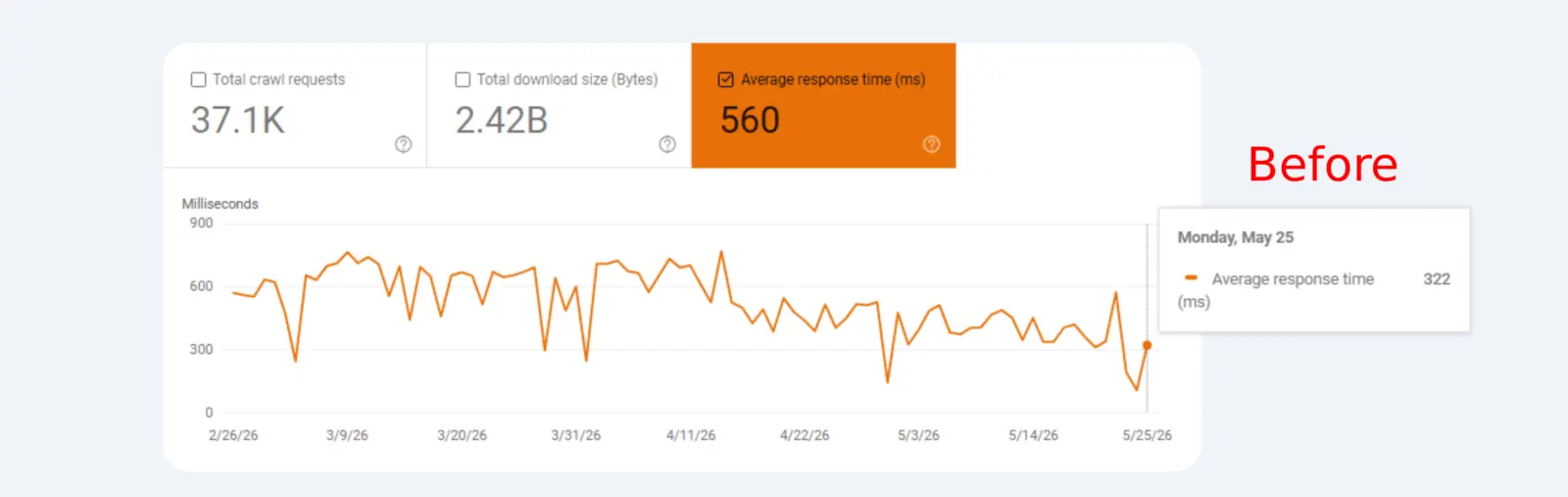
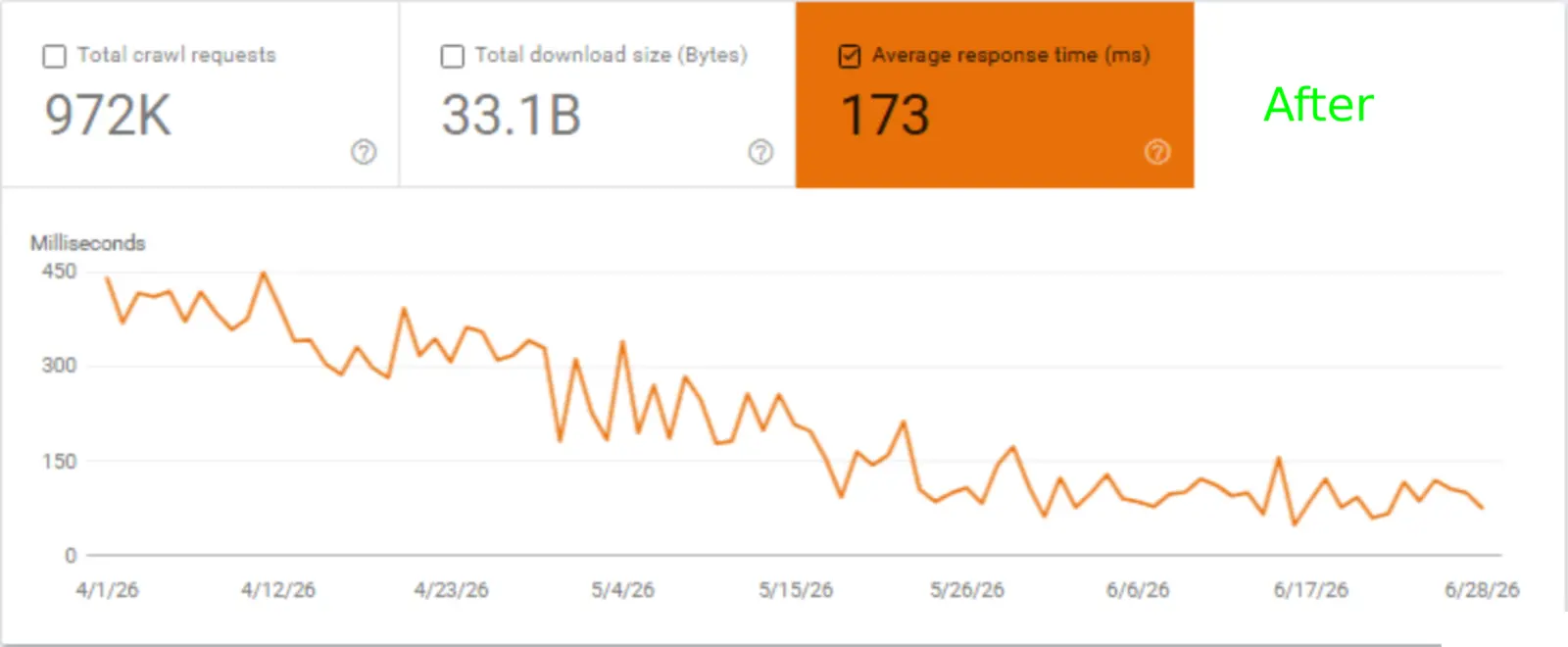
One of the key outcomes of the optimization project was a significant reduction in the website’s average response time. By optimizing Varnish, improving request handling, implementing proper Magento private content architecture, and strengthening WAF rules, the server processed requests much more efficiently.
Google Search Console’s Crawl Stats also reflected this improvement, showing that search engine crawlers were able to fetch pages faster after the optimizations were implemented.
Before vs. After
| Metric | Before Optimization | After Optimization | Improvement |
|---|---|---|---|
| Average Response Time | 560 ms | 173 ms | 69% Faster |
Response Time Trend
Before Optimization
560 ms
██████████████████████████████████
After Optimization
173 ms
█████████████████
⇓69% Reduction
What Contributed to This Improvement?
The reduction in response time was achieved through multiple optimizations working together:
- Improved Varnish Full Page Cache efficiency by normalizing cacheable URLs.
- Reduced unnecessary requests reaching the Magento application.
- Optimized handling of Magento private content using private_content_version and section_data_ids.
- Filtered unwanted traffic through the Web Application Firewall (WAF).
- Minimized backend processing by ensuring only dynamic requests reached Magento.
As a result, pages were served more quickly to both users and search engine crawlers, leading to a faster, more responsive website while maintaining personalized customer experiences.